
Written by Nicole Fishbein and Avigayil Mechtinger
UPDATE NOVEMBER 2023: IPStorm Infrastructure Dismantled by FBI
The FBI today revealed US law enforcement’s dismantlement of a botnet proxy network, along with a guilty plea for the individual responsible for the botnet infrastructure which was associated with the IPStorm malware. This achievement is a significant milestone in ongoing efforts to combat cyber threats. The research team at Intezer assisted in the FBI's case, sharing our findings and analysis about the new IPStorm malware variants and capabilities as it expanded to infect Linux, Mac, and Android devices around the world.
Below is Intezer's research about IPStorm that was originally published on October 1, 2020.
A Storm is Brewing: IPStorm Now Has Linux Malware
The development of cross-platform malware is not new, however, we continue to observe a number of malware that were previously documented only targeting Windows now targeting the Linux platform. One of these threats is IPStorm.
In May 2019, researchers from Anomali discovered a new Golang malware targeting Windows, which they dubbed IPStorm (InterPlanetary Storm). IPStorm is a botnet that abuses a legitimate Peer-to-peer (p2p) network called InterPlanetary File System (IPFS) as a means to obscure malicious traffic. It was found the malware eventually allowed attackers to execute arbitrary PowerShell commands on the victim’s Windows machine.
Our research team recently identified new Linux variants of IPStorm targeting various Linux architectures (ARM, AMD64, Intel 80386) and platforms (servers, Android, IoT). We have also detected a macOS variant. The macOS variant and most of the Linux samples are fully undetected in VirusTotal at the time of this publication. IPStorm is written in Golang, which enabled Intezer to detect cross-platform code connections between the Linux samples and the Windows malware first reported by Anomali.
The Linux variant has additional features over the documented Windows version, such as using SSH brute-force as a means to spread to additional victims and fraudulent network activity abusing Steam gaming and advertising platforms. The Linux variant has adjusted some features in order to account for the fundamental differences that exist between this operating system and Windows.
In this post, we will present a code relations graph between the IPStorm Windows and Linux samples, analyze one of the Linux variant’s behavior, and compare its features and capabilities to the old Windows samples to track its evolution. Following we will take a deeper dive into some notable features and explain how to respond to this threat.
Technical Analysis of IPStorm
Most of the IPStorm Linux samples were fully undetected before we submitted them for genetic analysis in Intezer.
In this post, we will focus on the 658638c6bef52e03e6aea4b6c1b2b3b8d81ad40144b56b2122d96e6957c33117 Linux sample.
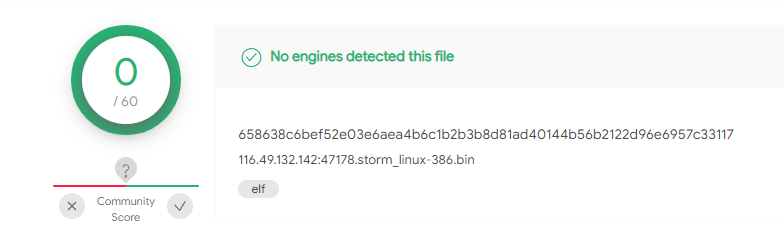
Because IPStorm is written in Golang, not only can we observe strong code connections between the different Linux variants, we can also identify connections to IPStorm’s Windows samples uploaded to Intezer in 2019.

The following map emphasizes code similarities between the different versions and operating systems. The nodes represent the individual samples and the lines are the code relations between them. All samples are linked to each other in some way:
- IPStorm PE files from 2019
- IPStorm ELF files from 2020
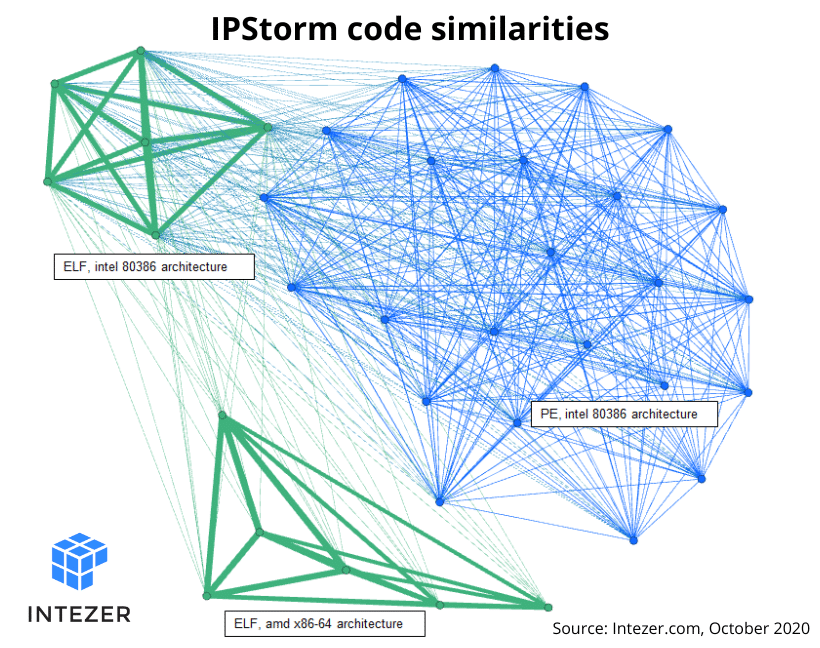
The graph depicts three main clusters, with each cluster containing samples that have strong code connections between them:
- PE, intel 80386 architecture
- ELF, intel 80386 architecture
- ELF, amd x86-64 architecture
You will also notice shared code exists between the ELF clusters and the ELF and PE intel 80386 architecture clusters.
You can use the cluster_directory.py API script in this GitHub repository to create a cluster graph of your own.
IPStorm Linux Variant Behavior Flow
The Linux variant symbols are stripped. Using the plugin IDAGolangHelper we retrieved the file’s symbols and saw exactly which packages the malware contains. A package in Go is a bundle of Go source files which make up a specific functionality. Every Go source file belongs to a package.
The Linux malware’s main logic is implemented in a package called storm_starter, a new package that was not in the Windows version. All logic was implemented via the main function in the Windows version.
Both versions have similarities in the way the main flow is implemented, however, the Linux instances have additional features and adjusted some logic due to the differences that exist between the two operating systems.
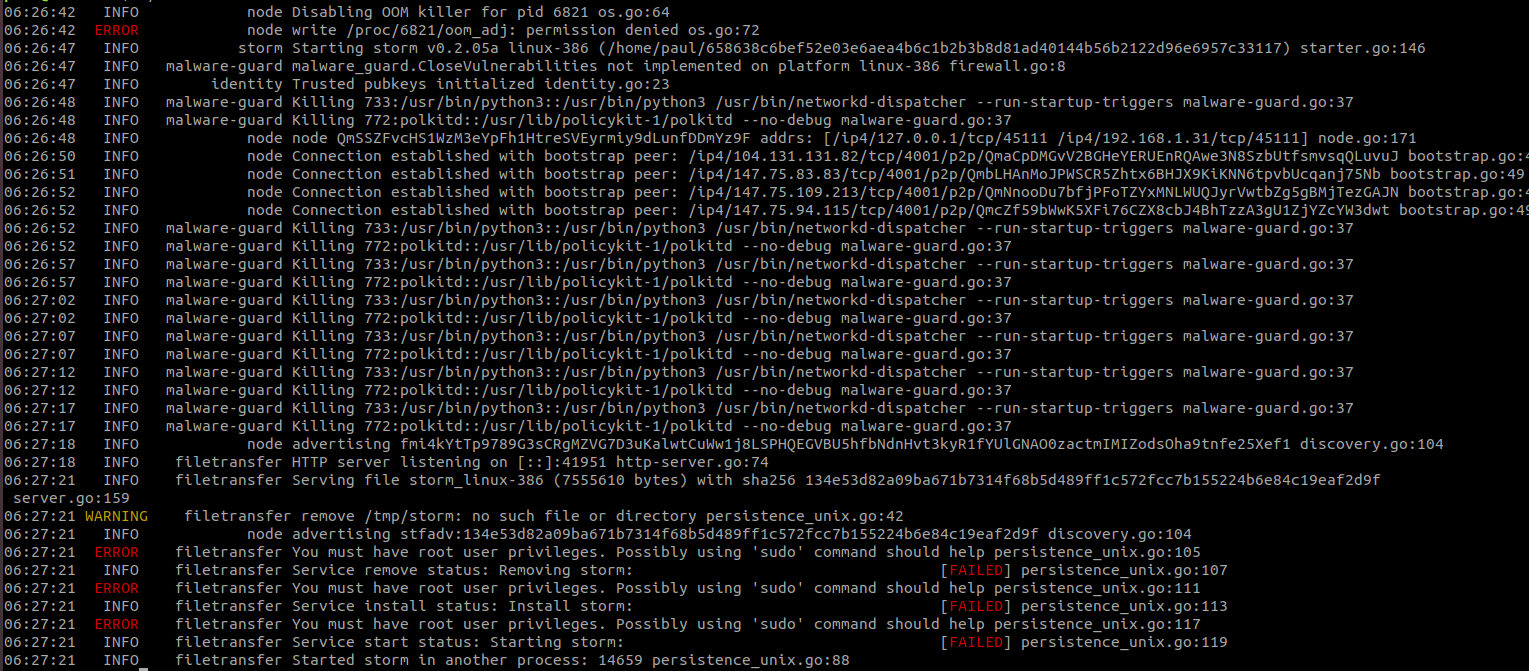
The Linux iteration starts by disabling the out-of-memory (OOM) killer in order to prevent it from terminating the malware. It then proceeds to check for any processes related to antiviruses or other security tools that may prevent further execution of the malware. Next the malware generates and saves pubkeys in a file called strom.key. The location of where this key is saved is based on privileges that the malware was executed with. If the malware was executed with root privileges, the key will be stored at /etc/storm.key. Otherwise, it will be saved at /tmp/storm.key. The malware then tries to establish connections with other nodes in the peer to peer network.
The malware sends HTTP requests to different services such as diagnostic[.]opendns[.]com/myip, ifconfig[.]io/ip, and myip[.]dnsomatic[.]com to receive the external IP address of the victim server. If the malware is running as root, it will create a service under systemd to achieve persistence and copy itself to /usr/bin/storm. Otherwise, it will be copied to /tmp/storm. The malware will then relaunch itself from the new installation path.
This new process is responsible for executing the main features of the IPStorm malware, including reverse shell, which was previously seen in the Windows variant—maintaining connection with other peers in the P2P network and a new feature for spreading the malware to other victims.
Linux vs. Windows Comparison
Comparing IPStorm Linux version 0.2.05a to Windows version 0.0.2m, it became clear the developer added features and altered existing ones to attack Linux platforms.
Packages Comparison
The malware is composed of different Golang packages with each package providing a different feature. The following table categorizes package comparisons between the two versions:
| Golang Package | Functionality | Linux Version 0.2.05a (2020) | Windows Version 0.0.2m (2019) |
|---|---|---|---|
| scan_tools | Scans for potential victims | + | - |
| web_api_client | Handles HTTP requests and responses | + | - |
| p2p (part of the web API) | HTTP over P2P | + | - |
| reque_client | Handles the communication of peers in the network | + | - |
| commander | Handles HTTP requests | + | - |
| starter | Implements the main logic of the malware (basically the “main function”) | + | - |
| malware-guard | Antivirus evasion | + | - |
| avbypass | Antivirus evasion | - | + |
| backshell | In charge of the reverse shell | + | + |
| ddb | Database | + | + |
| filetransfer | Persistence and managing file transfering to other peers | + | + |
| logging | Output log | + | + |
| node | Responsible for advertising the node, getting the external IP, and maintaining connection with other nodes. | + | + |
| powershell | In Windows, in charge of the powershell artifact in the backdoor. In the Linux variant, the package has only one function copied from the Windows version and is used for achieving reverse shell. | + | + |
| util | Utility functions | + | + |
| ddbinterface | DB functions | + | + |
| proxy | Implements Socks5 Proxy | + | + |
Note: We compared Linux version 0.2.05a to Windows version 0.0.2m which was analyzed in Anomali’s report. However, the malware is frequently being updated and we have observed multiple different versions since, so functionalities may differ between them.
Features Comparison
Scanning tools - Android and SSH brute-force
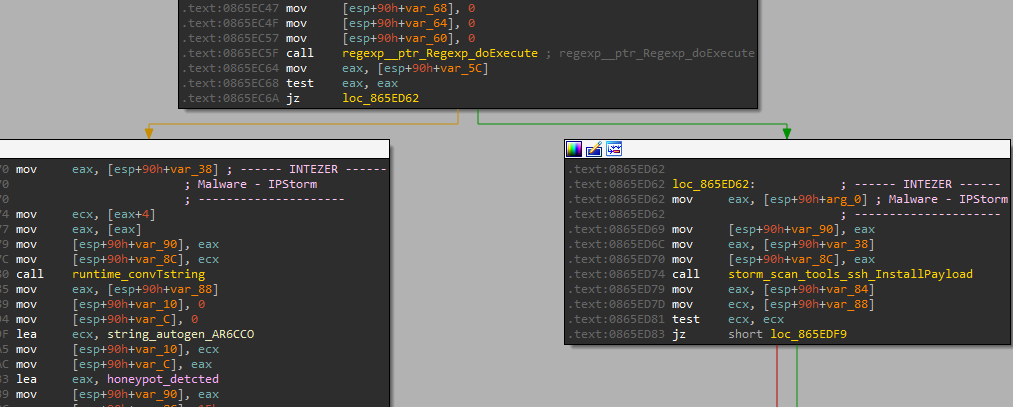
The Linux variant attempts to spread and infect other victims on the internet by using SSH brute-force. Once a connection is established, the malware will check if the victim server is a honeypot by comparing the hostname of the attacked server to the string “svr04”, which is the default hostname of Cowrie SSH honeypot. If the malware identifies a honeypot it will close the connection, otherwise it will proceed to download the payload and infect the server.
Another spreading method that is unique to the Linux version is searching for potential Android victims. The malware checks for devices connected with ADB (Android Debug Bridge) to the victim node. Once identified, it will upload an Android version of IPStorm to the device, which was previously downloaded from the P2P network.

Antivirus Evasion
Both IPStorm Windows and Linux versions implement features related to detection evasion and each variant uses a different technique. In the Linux version, the package in charge of this logic is called storm_malware_guard. The file iterates through all current running processes in order to find and terminate ones that might detect the malware’s activity.
The function under the storm_malware_guard package that implements this technique is called KillSuspiciousProcesses. Other functions in this package are responsible for obtaining information about the CPU and memory usage, number of I/O ports, and functions that return information about processes and threads.
In the Windows version, the AV evasion logic is implemented in a package called avbypass.
This technique is based on random sleep times and multiple function calls. The purpose of this method is to make tracing the original process harder for Antivirus solutions.
It appears that due to the different operating systems, each IPStorm version has its own way to evade detection.
Reverse Shell
Both IPStorm versions use the name backshell to refer to the feature of reverse shell.
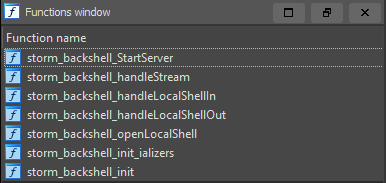
The backshell functions of the Linux variant are identical to those of the Windows variant.
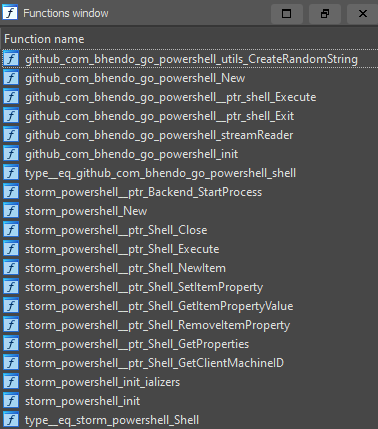
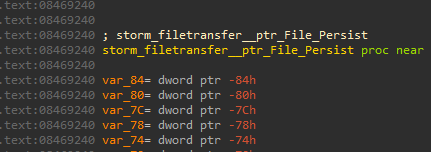
The Windows variant has a package called powershell which contains functions for achieving reverse shell. The same package is present in the Linux variant but it contains only one function: storm_powershell__ptr_Backend_StartProcess. The function is used to get a reverse shell on the infected system.
The implementation of the reverse shell is a clear example of the code reuse connections between the two IPStorm variants. The screengrabs below demonstrate changes in the file names and the identical function names found in the two versions:
Linux:


Windows:
Persistence
The Linux version will attempt to gain persistence only if it was executed with root privileges. The Windows version, on the other hand, will always look to gain persistence. It is evident that each variant of the malware, Linux and Windows, uses a different technique to gain persistence since the operating systems they target are fundamentally different.
The Windows variant achieves persistence by copying itself to a random location and adding the program to the HKCU\Software\Microsoft\Windows\CurrentVersion\Run registry key.
The Linux version achieves persistence by creating a systemd service under /etc/systemd/system/storm.service.
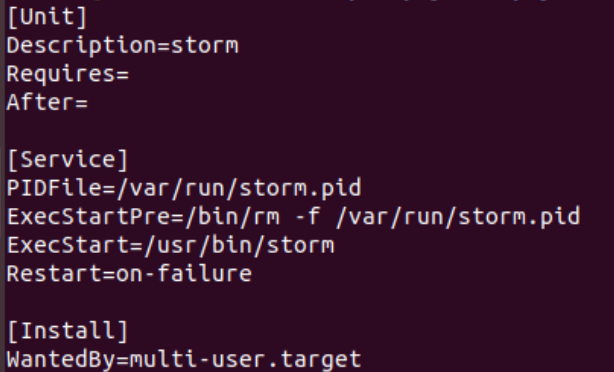
Another difference is the location to which the file is copied. The Windows variant uses random file paths while the Linux version uses fixed paths.
Network Traffic
On top of creating a reverse shell, we have detected that IPStorm’s Linux variant takes advantage of its being widespread to perform different fraudulent activity in the background, abusing gaming and ads monetization. Because it’s a botnet, the malware utilizes the large amount of requests from different trusted sources, thus not being blocked nor traceable. This activity was not observed in the Windows variant.
Steam Gaming Fraud
Steam is a popular gaming service from Valve Corporation and is used by hundreds of millions users worldwide. It also provides an API for developers who want to use Steam data on their own websites.
As part of the monetization process for game developers, Steam users can buy and sell different items such as equipment, skins, and other in-game elements. This platform is so popular that it has become a hot target for cybercriminals. A known method used by attackers is creating phishing websites to lure users to submit their Steam login credentials. With access to a user’s credentials the attacker has full access to the the account, API key included.
We noticed IPStorm generates a large amount of traffic to Steam’s API, querying data pertaining to various Steam users and using multiple valid API keys.

We suspect these are stolen accounts that are being monitored as part of a fake trade scam. Browse here for more information about this scam.
Ad Fraud
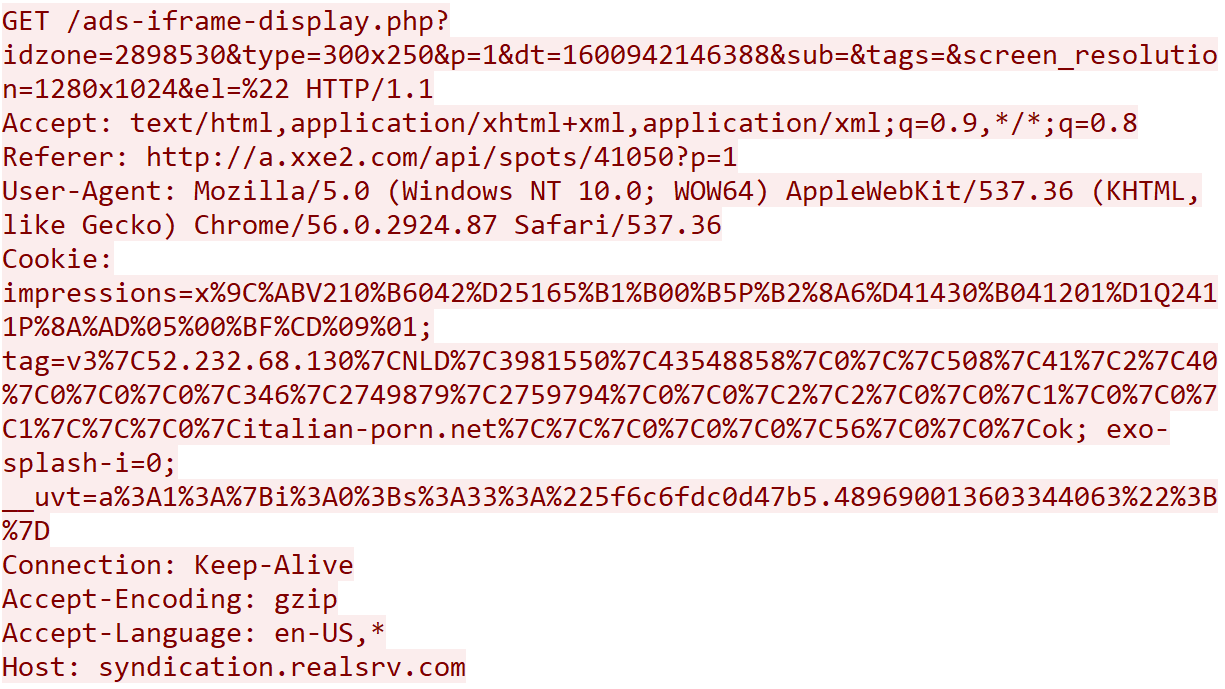
The malware generates requests which imitate fake advertisements clicks. All the ads we have traced are related to pornographic websites. The malware crawls through different predefined sites, searches for advertisement iframes, and imitates a user “click” by browsing through the iframes.

IPStorm Detection and Response
Compromised System Detection
You can take the following steps to check if your system has been attacked by the IPStorm malware.
Check if the process of IPStorm is running on your system. Run:
pstree | grep storm
IPStorm will usually run with multiple threads.
Check the services that run on your system, since if the malware was executed with root privileges it would create a service for persistence. Run:
sudo systemctl status strom.service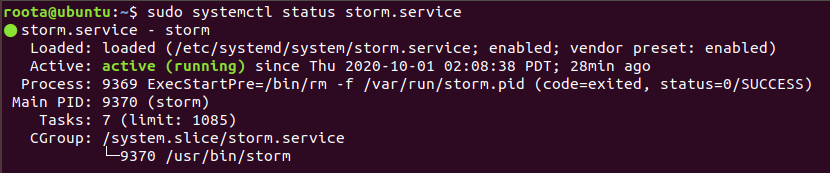
Check if IPStorm’s files exist in your system. Run:
sudo find / -name "storm*" -type fIn case of a non-root execution the output will look similar to the screen capture below:

If the malware was executed with root privileges, the output will look similar to the screen capture below:

Check the open ports on your system and the processes that are associated with them. Run:
sudo ss -tulpnIn the screen capture below a number of processes that belong to the IPStorm malware listen on specific ports.

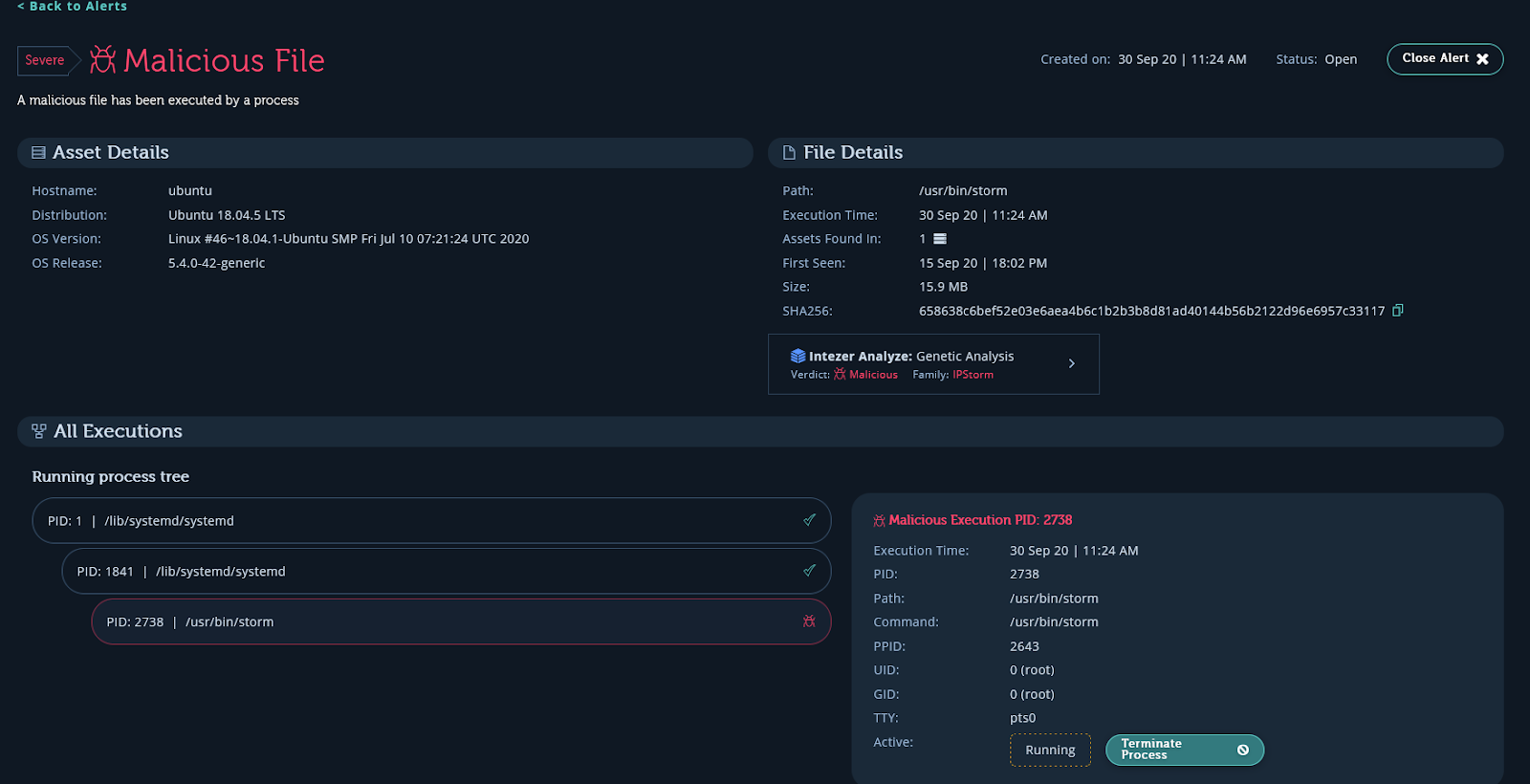
Use freely the Intezer Protect community beta to identify which process is running on your system. The screen capture below is taken from the alert of IPStorm executed on a server. The info provided by the system includes the malware family name, full path of the executable, the process ID, execution time, and a link to Intezer where you can observe code reuse prevalent in this malware.
How to Terminate IPStorm on a Compromised System
- If the malware runs as a service you should stop the service by executing the command:
sudo systemctl stop storm.service - Delete all the files that are related to the IPStorm malware. The file paths are mentioned in the previous section.
- Kill the process by running:
sudo pkill -9 storm
Response
We are providing a YARA rule intended to be run against in-memory artifacts in order to be able to detect these implants.
System Security Hardening
- Make sure your SSH connection is secured. Use a key instead of a password or use multi-factor authentication. Browse here for more tips about SSH hardening.
- Make sure your system is updated to the latest software and aligned with most recent security best practices.
- Use a runtime cloud workload protection solution. Protect provides full runtime visibility over the code in your system and alerts on any suspicious or unauthorized code that deviates from the secure baseline.
Summary
IPStorm now with Linux malware is the latest example of a cross-platform malware developed in Golang. Platforms that are compromised by IPStorm are not only exposed to a backdoor to their services but are also added to the IPStorm Botnet which attempts to spread to other victims. The attackers behind IPStorm are very active evidenced by the frequent release of updated versions with new features and improvements, as well as the expansion to several different platforms and architectures.
IPStorm is part of a growing list of Golang ELF malware that have been spotted attacking live servers in the past six months alone, together with Kaiji, Kinsing, and FritzFrog.
We want to give a special thanks to Paul Litvak and Michael Kajiloti for their help contributing to this analysis.
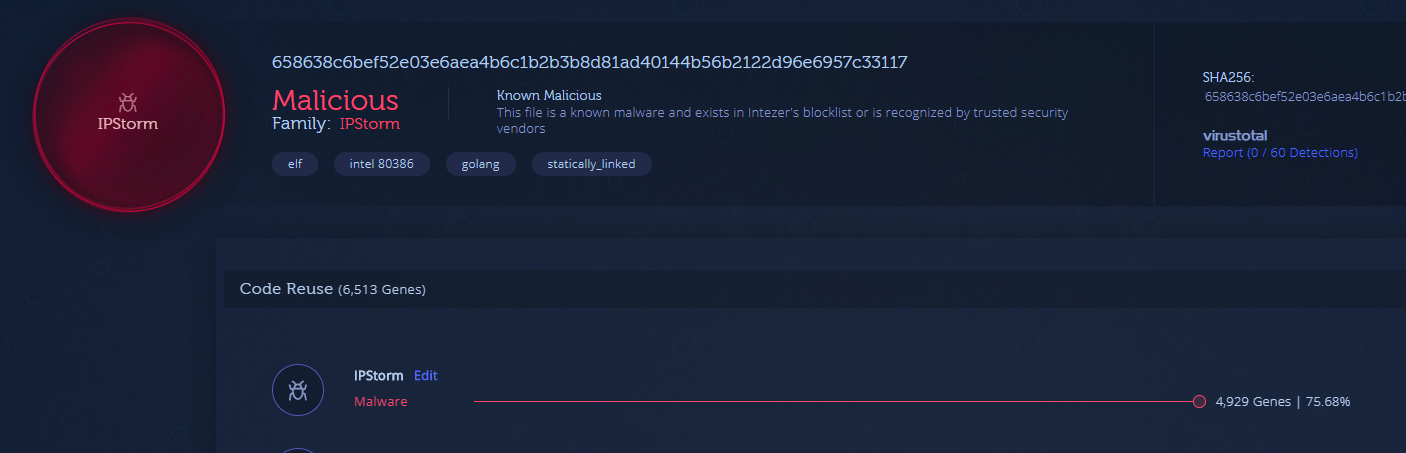
Both IPStorm Linux and Windows samples are indexed in Intezer and you can detect this and other cross-platform malware with the code reuse feature for Golang, just by uploading a file or hash to the system. Below is the analysis of one of the Linux samples.
IOCs
Linux
3aff4695c73709e2e0e55665c4850aa45064723a2c83e75325b27e77ec5f6d97
b80346c4d31d77fba9427024d34af2f43e64a5272b5bbef28c6bf045a06143ff
d233c37f2d49badbf53d054bce7fb8e787c9973067e8dcd79835d7816aacfa43
658638c6bef52e03e6aea4b6c1b2b3b8d81ad40144b56b2122d96e6957c33117
bfb69eadee1918a9402478c76dd15696bbac3e3e3e57c9a94c7d51e594b8c657
64abc2cf5866e932b0731a6deb487aa3d9756724250de26bac2fb930cd478dc0
52f215521ba59cb6a51314bd1527f1c540ffc04df924ad971ca2160405879778
aa7639b11f7c852005110e5ac34c9a2c94c562bcc95dbf6f60a1a7192cf8ea77
cae8a782765dd0f97e7a812a245cc5b94b3179ced9c8181d0fda13978c9f17be
5103133574615fb49f6a94607540644689be017740d17005bc08b26be9485aa7
08bf31862577567a56bf3be6425f1ddf4ac90914efd883a75a5a53dbcabd28a2
984c5e980fb8a5b7bbc673f923f22ddf06c5dd89fcd0acf774d79d4d193b44c8
591770835066958e912ceb445bd865e961ac946e8cf70ced9f0bd75c851d9478
69ea7bcf3da16d968e6104745c1f015f6371c093188f1061a311a6385985b45b
fbd5e48ee691df949e0dd3687755c80cc5b9d1a1a89e7dc486694370697de893
c247b3c07b4bf13da67c51d5834193d128c45c7e41214096090b5d2610313783
f4f1fb65df80666fe67b22b84d9d8f967449d1249c33ad97f4305784fa41e747
ef226de8cc53e59c9431838085f3bbd1b8a32f7cc135682033a3fdba19a0ee97
dfeecdd23f28f80e42e58c87c9a4858648964b3100dfb899c61b54aed7856cf7
db9c95bdc4247ff6cdaf8a8e47b4add21a730461d8f6e2693136aecd346b3fb5
b4c75e1d94bc4c8affd6d9f433585ace2738772e6a04403ab67cce3df9574068
b07c2dfb4c57175446b6188bb4b1722272f63a301f18c5f46ee6401347894fea
a5468b6130d90bc74cf8e458297f6d4c7fc42b87184623aefd535bca658542ed
7c41de95313dc98a3fc4f6fe3910759c3561743dacc629dab11e754290f8c7aa
7b044b8eddd20d8e1c7d499a6c34b1bc373f5fe9d59bab7b4e3a341a5f4ce0b5
79ec318a968679f94d2ab0ba15daaeeb71406d2f744eb0cd1b314c4bb403114d
52b081dbaafbbae8ad812f9c50a1a5f7d8b0850b3c6dc69eccb3322f34286c2e
50406ec7fa22c78e9b14da4ccc127a899db21f7a23b1916ba432900716e0db3d
1d0e003ee653d1a7b80ff5e69c33689af04e45fc836a29e0853219dd100fd534
16bcb323bfb464f7b1fcfb7530ecb06948305d8de658868d9c3c3c31f63146d4
macOS
522a5015d4d11833ead6d88d4405c0f4119ff29b1f64b226c464e958f03e1434
Nicole Fishbein
Nicole is a senior security researcher and malware analyst at Intezer. Prior to this, she was an embedded researcher in the IDF Intelligence Corps.
In this article
Share article
Related Articles
.svg)
AI SOC
The emergence of the tierless SOC
AI is retiring the SOC pyramid. Learn how a tierless AI SOC investigates 100% of alerts with forensic evidence while your analysts supervise outcomes.
.svg)
Research
5 min
NinjaMare and the enterprise security epidemic hiding behind a harmless label
The PUA label, aka "potentially unwanted application" means nuisance. Adware, toolbars, and other things that change your settings without asking. Our research team's findings say this label is far more serious than a mere nuisance.
.svg)
Alert Triage
AI SOC
3 min
We let a fruit fly brain triage 12,716 real SOC Alerts. Here is what happened.
On behalf of people who run SOCs, we explore how a fly brain triages alerts compared with a boring linear model you could train in eleven seconds.