

Significantly reduce memory forensics time from hours to minutes
Memory analysis is a core component of a typical incident response process. In many cases incident related artifacts, such as injected malware code, leave no traces on disk and can only be found in memory. As best practice, the analysis is usually not performed on the target machine’s live memory but rather on a snapshot of the machine’s memory in the form of a memory dump.
While powerful memory analysis tools such as the Volatility framework and its various plugins provide the analyst with much needed capabilities, analyzing a memory dump is still a daunting and time consuming task—requiring expert level skills to be done successfully. Memory dumps are very large, containing a snapshot of all running processes on the target machine. Even with the required skills, unless the analyst has a solid lead, it can take a lot of time and effort just to answer basic questions such as:
- Is this machine infected with malware?
- What malware is it?
- Which artifacts are worth a deeper look?
Because of the aforementioned challenges, security teams sometimes skip memory forensics altogether and remain without necessary answers, leaving them blind to memory attacks.
Intezer’s enterprise plugin for Volatility builds upon the framework’s robust capabilities, using Genetic Software Mapping to analyze and classify all binary code inside the memory dump. Using our plugin you can immediately see exactly what code was running, classify any malicious components, and filter out all trusted application code, allowing you to focus on unique or suspicious artifacts worth taking a deeper look.
Example
To best demonstrate how the plugin can assist you during memory analysis let’s follow a mock scenario.
There has been an incident of a suspected cyber attack on your organization and you are assigned to investigate it to find out what you are dealing with. The SOC team has noticed suspicious network activity coming from several different machines in the organization. The machines have been disconnected from the internet, their memory has been dumped, and they were turned off.
Now you need to analyze the memory dumps and find out if those machines were infected with malware, and if so, what kind of malware. Where do you start? Manually analyzing a single memory dump just to answer basic investigation questions can take days. This problem is magnified by the number of memory dumps in the organization that need to be analyzed.
With Intezer’s Volatility plugin getting answers can be as simple as running a single volatility command (for each memory dump):

Once executed, the plugin will extract from the memory dump all running executable modules and libraries as well as hidden shellcode pieces, then send it to Intezer Analyze. The extracted code components are genetically analyzed and classified, and an interactive report is generated where the results can be viewed in Intezer Analyze.

The generated report clearly shows that the machine this memory dump originated from is infected. The infection consists of 2 distinct threats: the information stealer botnet, Loki, and malware that contains code from Lazarus, the infamous North Korean hacker group.
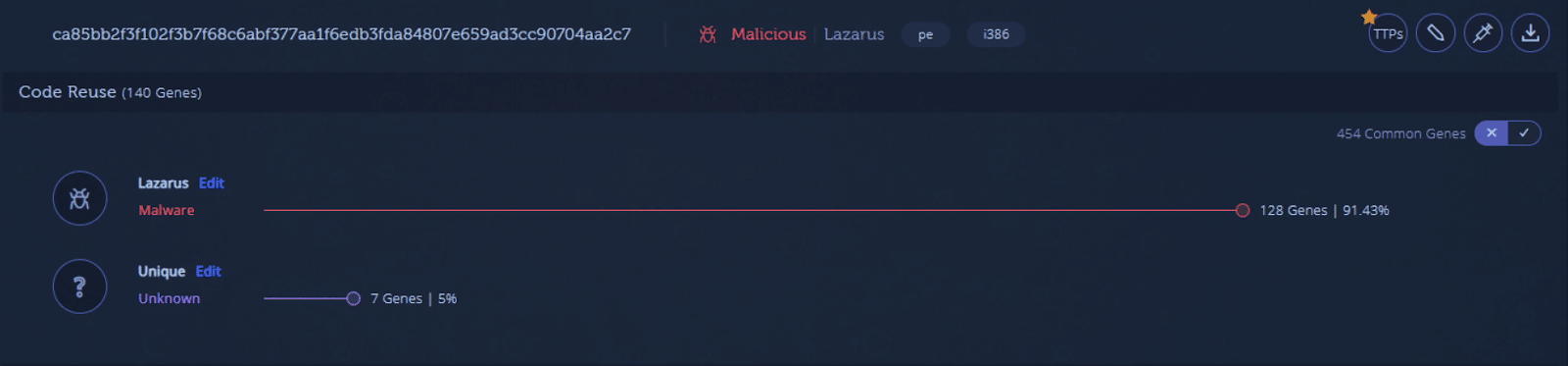
There are also other unique pieces of code that may be worth manually analyzing later but you already have a good understanding of what you are dealing with and can begin working on remediation. You can also repeat this process for other memory dumps to understand the entire scope of the incident and quickly discover other threats that may be involved.
See for Yourself
Get more information and download the plugin here. The plugin is available via our enterprise edition.

Intezer
Count on Intezer AI SOC to triage, investigate and respond to every alert at unmatched speed and accuracy.
In this article
Share article
Related Articles
.svg)
AI SOC
The end of the SOC pyramid
AI is retiring the SOC pyramid. Learn how a tierless AI SOC investigates 100% of alerts with forensic evidence while your analysts supervise outcomes.
.svg)
Research
5 min
NinjaMare and the enterprise security epidemic hiding behind a harmless label
The PUA label, aka "potentially unwanted application" means nuisance. Adware, toolbars, and other things that change your settings without asking. Our research team's findings say this label is far more serious than a mere nuisance.
.svg)
Alert Triage
AI SOC
3 min
We let a fruit fly brain triage 12,716 real SOC Alerts. Here is what happened.
On behalf of people who run SOCs, we explore how a fly brain triages alerts compared with a boring linear model you could train in eleven seconds.