When analyzing malware, one of the goals in addition to identifying what malware it is, is to understand what it does when it runs on a machine. There are multiple ways of achieving this by either manual analysis, which requires reverse engineering skills, or automated analysis. With Intezer Analyze we provide a tool that aids both advanced reverse engineers and entry-level analysts with the task of analyzing any suspicious file. Earlier this year we announced a new feature in Intezer Analyze that extracts the capabilities of a file. From the capabilities, you can map these to known Tactics, Techniques, and Procedures (TTPs). Under the hood, the functionality is powered by an open-source project from FireEye called capa. Capa analyzes Windows portable executable (PE) files and matches the findings against a rule set to determine a file’s capability. Intezer Analyze is not limited to PE files. It can also detect code reuse between Executable and Linkable Format (ELF) files. With this in mind, we wanted to provide similar information for ELF files. To achieve this, we extended capa support to ELF files and also created rules for Linux ELFs. Since capa is an open-source project, we submitted the changes to the capa project to allow not only users of Analyze to take advantage of this new functionality but also users of capa. So let’s explore how we can use these new features in Intezer Analyze when investigating both PE and ELF files.
Supercharge Code Reuse with Capabilities
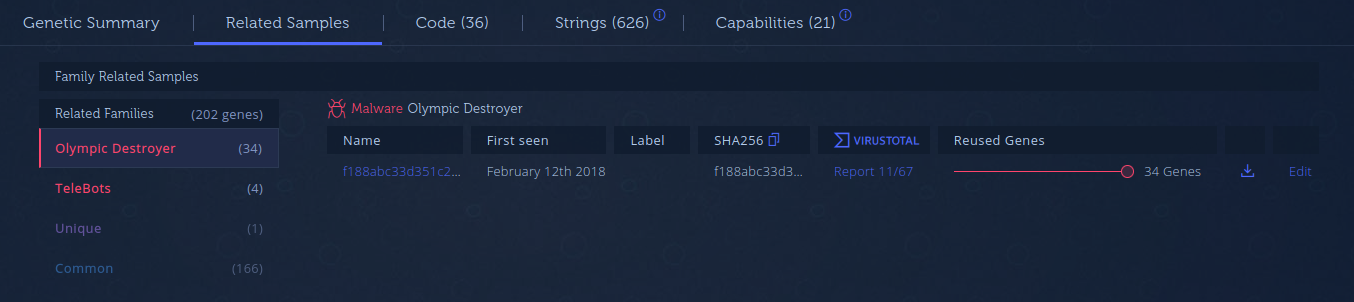
One beautiful marriage is the use of capabilities extracted by capa and malicious code reuse (aka code genes) detected by Intezer Analyze. At Intezer, we have a vast gene database of both known malicious code and code from trusted vendors. This allows for the detection of different malware versions but also detects when code is shared between different malware families. This can be used to attribute new malware to previously known threats. Another strength of code genes is that it allows for the determination of which functionality is shared between different malware via code reuse.
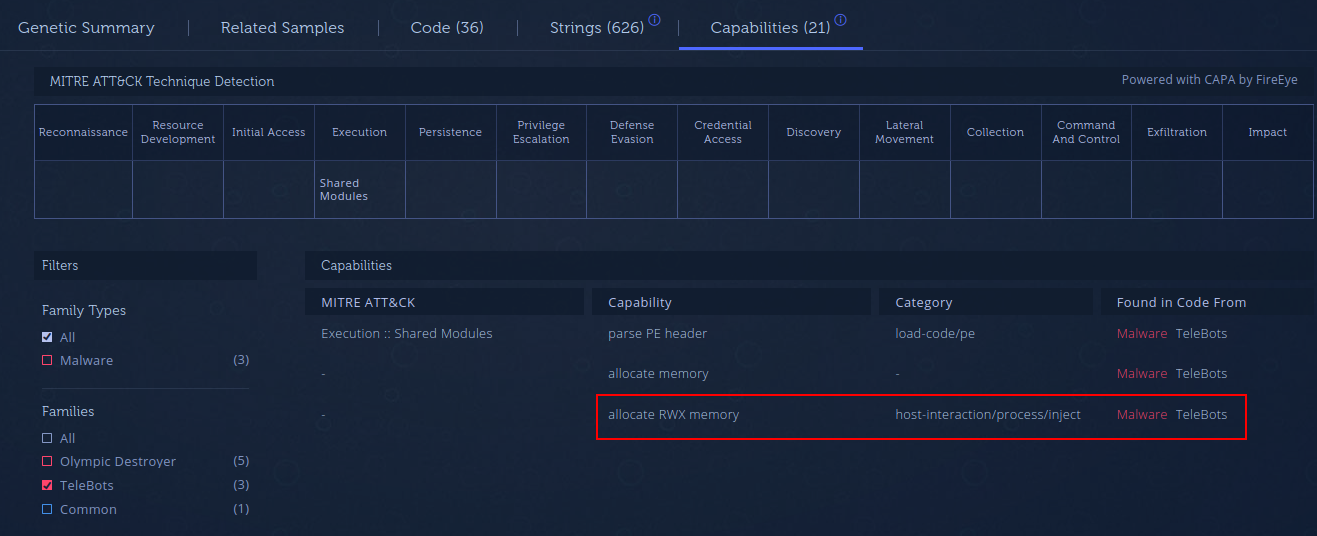
In biology, genes serve as the blueprint for proteins and the proteins affect what a cell will do. A parallel can be drawn to computer code. What a file will do, is dependent on its capability. The capabilities are “codified” in its code genes. What this means is that by connecting capabilities to code genes, we can detect that a capability is shared between different malware families, thus making a strong connection between them. To see this in action, let’s look at a practical example.
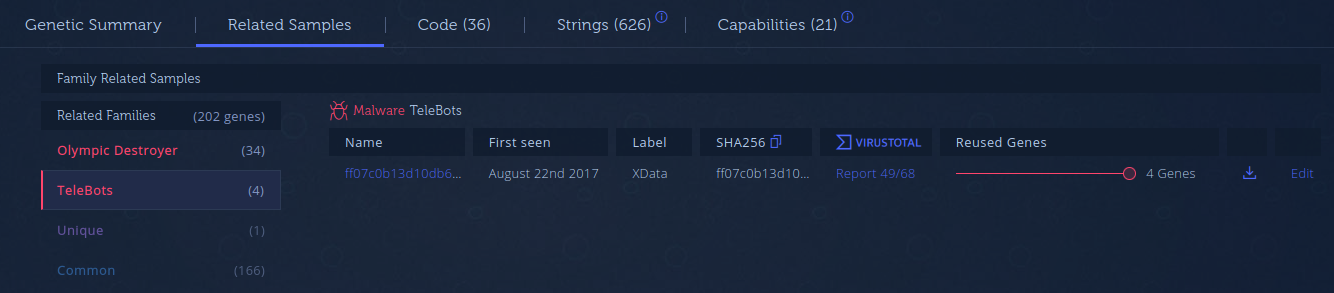
The following example uses one of the Olympic Destroyer samples (3e27b6b287f0b9f7e85bfe18901d961110ae969d58b44af15b1d75be749022c2) that was part of Cisco Talos’ report. Olympic Destroyer is a good example because of all the false flags planted by the threat actor. If we analyze the sample, you can see that it drops a number of other files. The analysis of one of these files is shown in Figure 1.

Analyzing Capabilities of ELF Files
Capa is a great tool for extracting capabilities of files and until now it only supported PE files. To provide the same functionality for ELF files in Intezer Analyze, we expanded capa’s functionality. Intezer Analyze has been supporting ELFs for some time now but with the release of capa v3.0, which includes our improvements and rules for Linux ELFs, similar capability extraction can be performed by using capa.
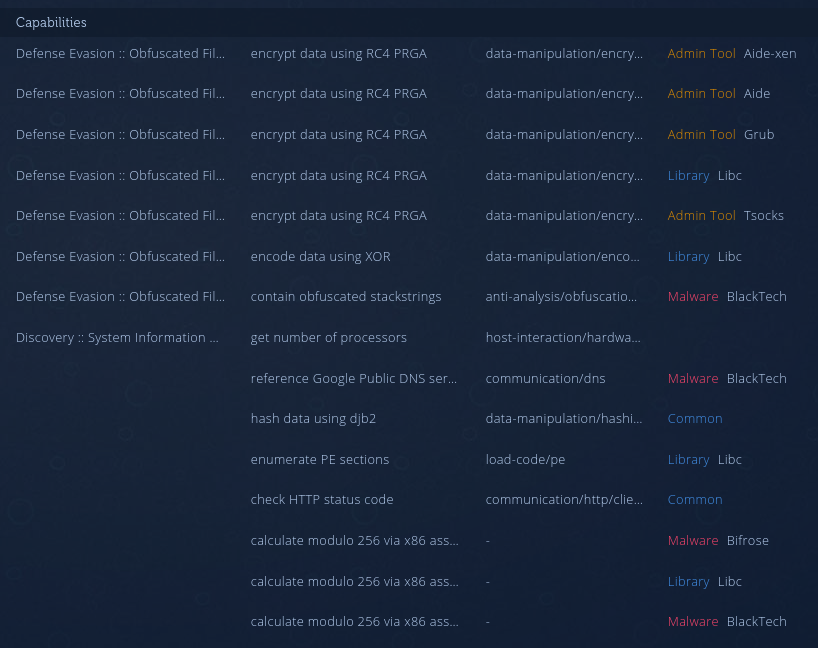
As with Windows PE capability detection, Intezer Analyze also correlates detected capabilities to code genes for ELFs. This means a similar approach can be applied as documented above when it comes to analyzing code reuse and capabilities. Figure 5 shows the capabilities detected for a RedXOR sample that we released a report on earlier this year. From what we can see in the table under the TTPs tab, the way the capabilities have been implemented is unique to RedXOR.

Conclusion
Code gene analysis is a great way to find shared code between different malware families. By correlating code genes to the capabilities of a file, you can add another dimension to your malware analysis. In addition to Windows PE files, Intezer Analyze now allows this to be performed on Linux ELF files. This was possible by extending the functionality of an open-source project called capa. We are grateful that FireEye open-sourced capa as it allowed us to extend its functionality to support ELF files. As we are not only users of open-source, we also enjoy providing improvements and bug fixes to open-source projects. Additionally, we also have released some of our own. Check out FireEye’s blog post on capa v3.0 release here. Try your own capability analysis in Intezer Analyze by creating an account with 50 free analyses per month.

Joakim Kennedy