

In this blog post we’d like to share with you some details about our latest cool developments.
New User Interface:
We’ve recently added to our product, support for Dynamic Execution and Static Extraction and we wanted our user interface to reflect these additions.
The “Tree View” on the left panel of the page, reflects the original file and the files that were extracted from it. Clicking on each node, will reveal the relevant analysis for every sub analysis.
This new user interface enables our users to see the full analysis in the right context together, without having to jump between pages. In addition, it will enable us to easily add more sections like String reuse (coming soon!) and to significantly enrich the context/information for each analysis.
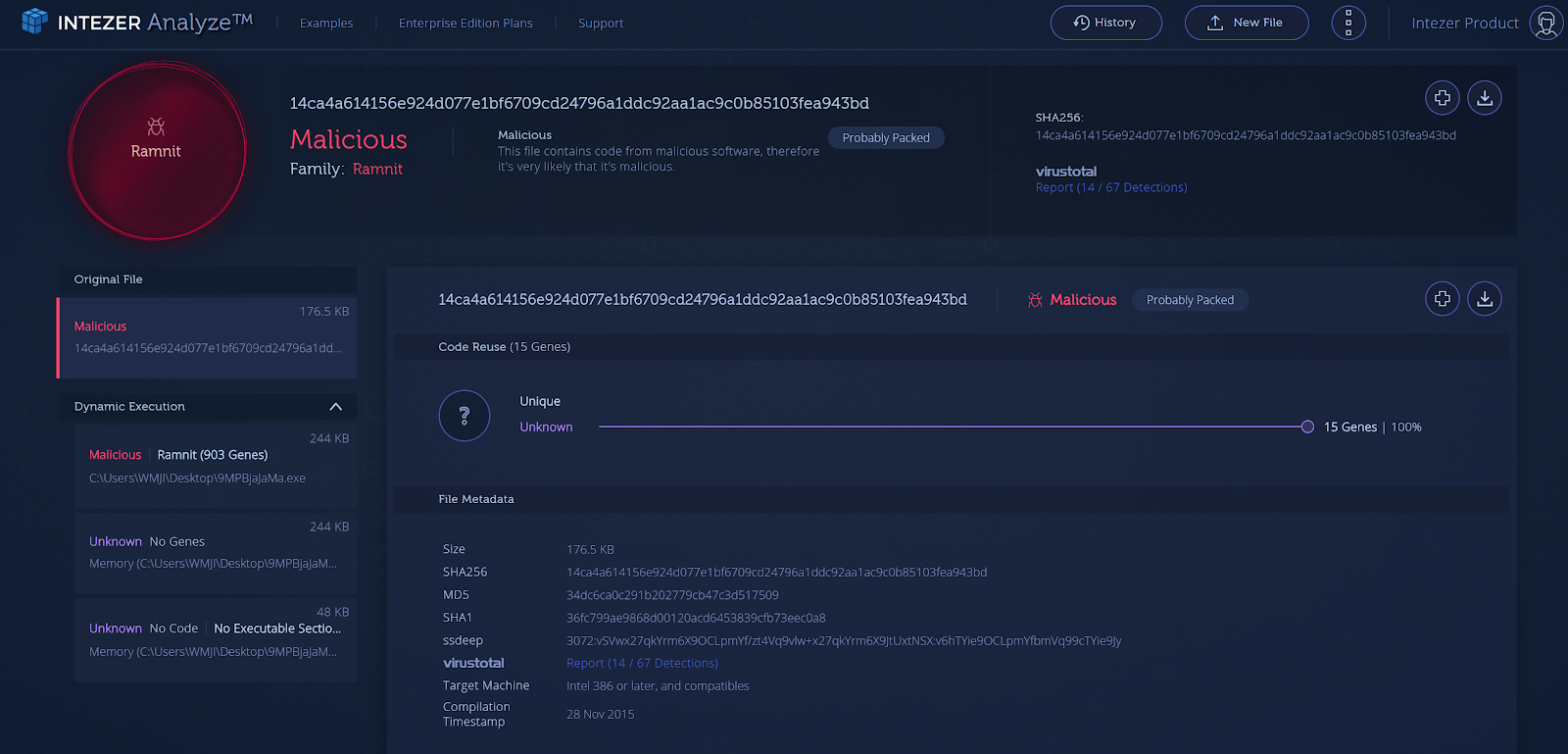
Installers Analysis:
There are various reports about installers used to disperse malware. For example, the NSIS installer (Nullsoft Scriptable Install System) was used in several ransomware campaigns. In addition, looking at uploads from our customers and community edition, as well as data from other reports, convinced us it was time to address this phenomenon.
Now, when Intezer Analyze detects code similarities to a certain installer, it will automatically extract the files (recursively, so that no file is missed). Then, it will analyze them using our Code Intelligence™ technology to provide a much deeper analysis of the uploaded file and inspect every piece of code in the extracted files. Other non-executable files, are analyzed using other sources, to deliver a picture of what’s inside the compressed installer file.
You can see some very interesting results here:
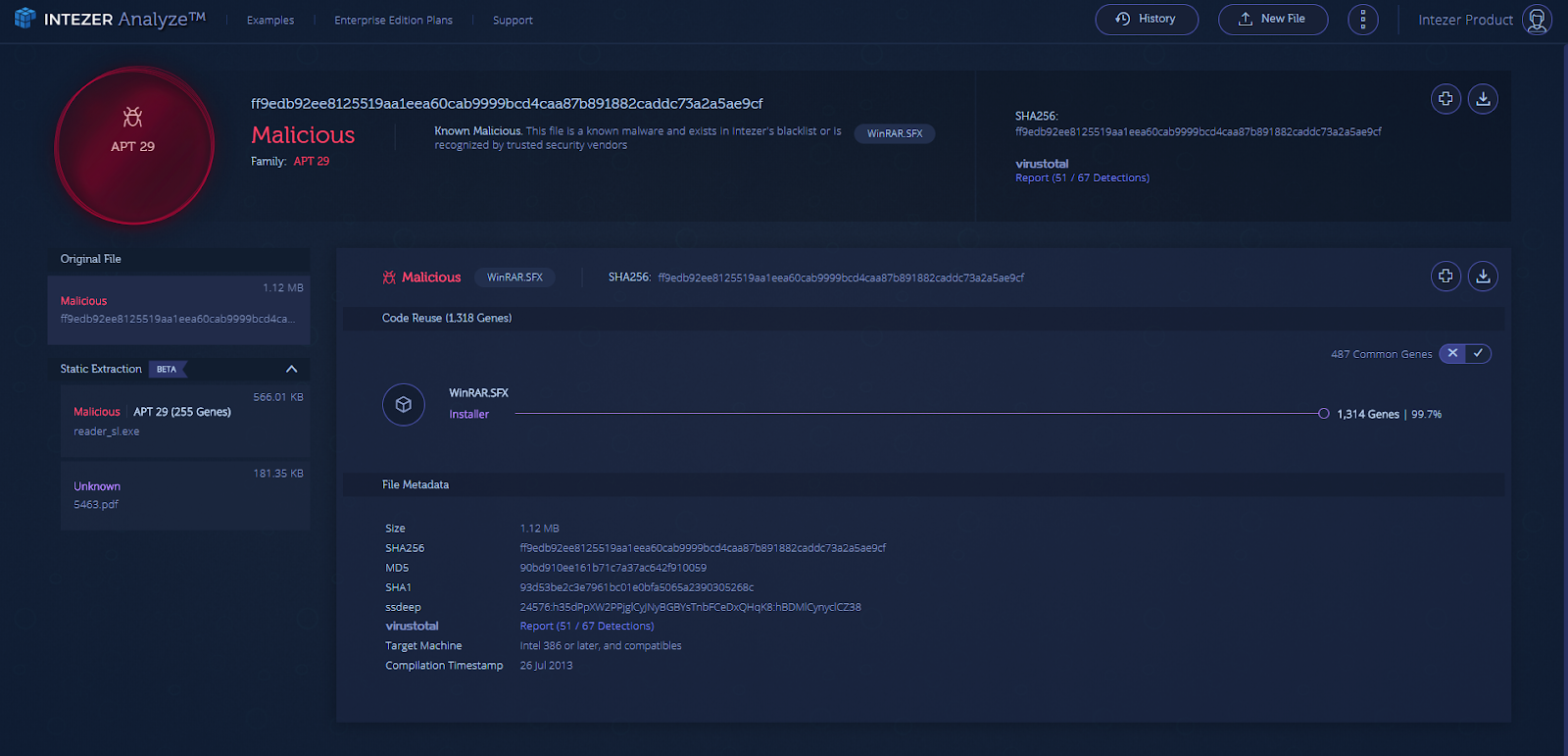
After extracting the WinRAR.SFX installer, 2 files we discovered:
. Executable file (reader_sl.exe) that is classified as APT 29
. PDF file (5463.pdf)
Integrations:
At Intezer, we believe in API-driven development, to ensure our customers benefit from simple integration with other products.
We’ve recently enabled some valuable integrations for our customers and for the community:
Splunk Integration:
Splunk is one of the most widely deployed SIEM products in the world. One of the main challenges enterprises face in their SOC, is the ever-growing number of alerts in their SIEM system. By integrating Intezer with Splunk, enterprises will benefit from an automatic analysis for every alert (based on hash or file), as well as an enrichment of each alert with classification of the file.
Classifying files into threat categories provides the enterprise with a distinct advantage: the additional layer of malware classification enables Incident Response teams to effectively prioritize alerts. For example, a nation-sponsored attack, that requires immediate attention and eradication will be given priority over an instance of generic malware.
In order to download this plugin, please go to: https://github.com/secops4thewin/TA-intezer
We’d also like to take this opportunity to thank Mickey Perre from Splunk (@MickeyPerre) for his initiative to build this plugin.
Demisto Integration:
Demisto is a Security Orchestration, Automation and Response (SOAR) Platform that combines orchestration, incident management and interactive investigation into a seamless experience. Demisto’s orchestration engine automates security product tasks and weaves in human analyst tasks and workflows.
By integrating Demisto and Intezer, it’s possible to automate incident-response processes such as investigating suspicious files (or hashes) with Intezer Analyze to get an almost immediate response for incidents, with the relevant detection and classification from Intezer.
We’d also like to take this opportunity to thank Nitzan Peretz from Demisto for his initiative to build this plugin.
MalScanBot:
While it’s not for enterprise purposes, it’s important for us also to contribute to community projects. MalScanBot is an initiative by Omri Moyal (@GelosSnake), to scan malware in Telegram bot. It’s possible to get Intezer’s detection through this interface.
https://twitter.com/GelosSnake/status/1006662406817411073
There are many additional integration options and we’re already working on some of them. If you would like to suggest an integration with our product, please contact us at: contact@intezer.com
Analyses History:
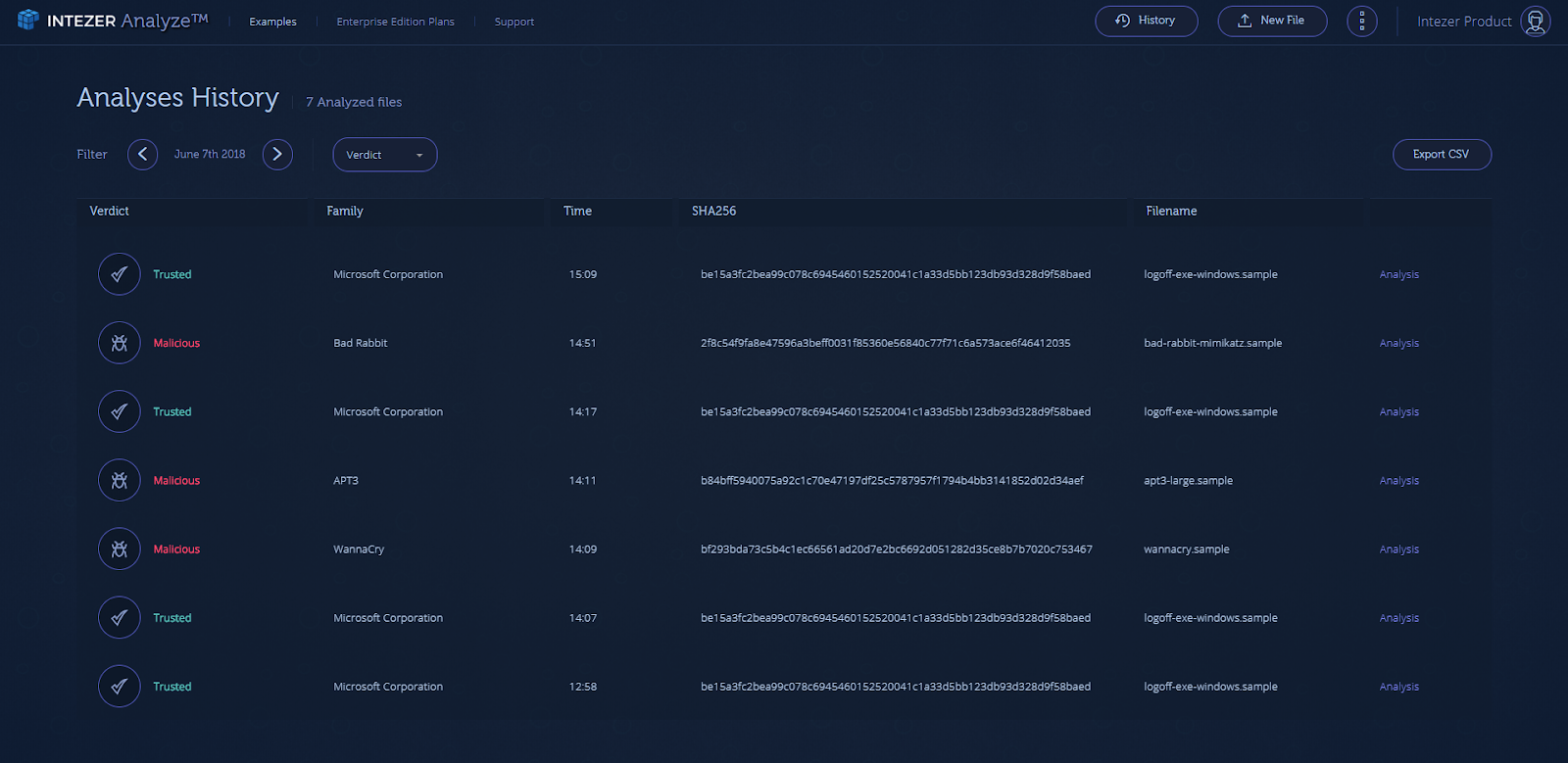
Another recent addition to our product is the ability to browse your submitted files through the “Analyses History” page.
On this page, you can browse through the results of daily analyses, dive into a specific analysis result, export analyses results to a CSV file and more.
Product Version:
As part of the data we display for every file that shares code with the uploaded sample, you will now be able to also see the product version data. This feature applies to trusted software (like WinSCP) and libraries (like OpenSSL in the example below). Each product version shares a lot of code with previous versions. Using this new information, you can further understand the context of the code similarities, know the exact version of library/software your uploaded sample is most similar to, and even see the beautiful evolution of a software:
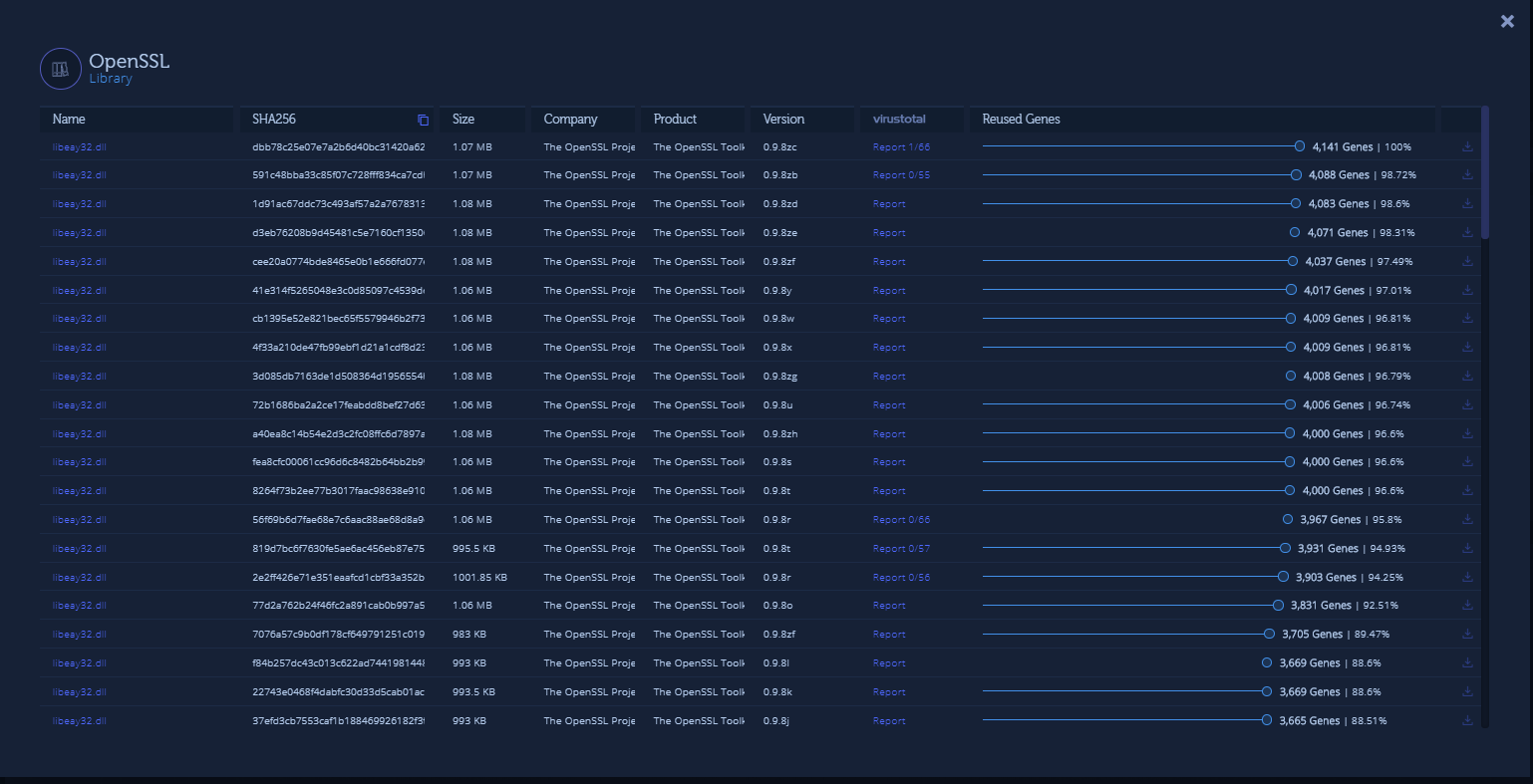
Figure 5: Product version data is now part of the file data display
Summary:
We’re constantly working on interesting developments and we have some more exciting product updates coming soon. As always, we’re really happy to get your feedback, we learn from it, value the time you take to provide it and we are doing our best to address your requests. Contact us at: contact@intezer.com

Intezer
Count on Intezer AI SOC to triage, investigate and respond to every alert at unmatched speed and accuracy.
In this article
Share article
Related Articles

AI SOC
100 CISOs ranked their 2027 priorities for a16z: AI SOC takes #1
Andreessen Horowitz (a16z), one of the world's biggest venture capital firm, recently published their survey of 100 CISOs at companies with more than 1,000 employees. The findings reflect what we are seeing with our customers and provide a realistic outlook for our era of agentic attacks.
.svg)
AI SOC
The end of the SOC pyramid
AI is retiring the SOC pyramid. Learn how a tierless AI SOC investigates 100% of alerts with forensic evidence while your analysts supervise outcomes.
.svg)
Research
5 min
NinjaMare and the enterprise security epidemic hiding behind a harmless label
The PUA label, aka "potentially unwanted application" means nuisance. Adware, toolbars, and other things that change your settings without asking. Our research team's findings say this label is far more serious than a mere nuisance.