
SOC Automation Tools: 11 Top Platforms and 8 Key Capabilities
In this article

TL;DR: SOC automation tools collect, enrich and correlate security alerts and act on them so analysts spend less time on manual triage. Intezer is best for forensic-depth triage of every alert, Cortex XSOAR for broad playbook orchestration, Tines for accessible workflow building, and Microsoft Sentinel for SIEM-native automation.
What Are SOC Automation Tools?
SOC automation tools simplify and orchestrate repetitive security operations like alert triage, threat enrichment, and incident response across an organization's tech stack. This reduces the manual work required to investigate common threats and helps analysts focus on incidents that require human judgment. Automation is especially useful for repetitive security operations center (SOC) tasks.
Key features to look for:
- Automated alert triage: Validates indicators, removes duplicates, correlates related events, and prioritizes alerts based on risk.
- Threat intelligence enrichment: Adds reputation, malware, campaign, and internal context to indicators automatically.
- Automated investigation: Collects endpoint, identity, network, email, and other evidence without requiring analysts to query each system manually.
- Incident response playbooks: Runs repeatable investigation and response workflows with decision points and approval gates for sensitive actions.
- Security tool orchestration: Connects SIEM, EDR, identity, firewall, cloud, ticketing, and other systems to coordinate actions across the security stack.
- AI-assisted analysis: Summarizes alerts, identifies relationships, classifies incidents, extracts indicators, and suggests investigation or response steps.
- Behavioral analytics: Detects unusual activity by comparing user, device, and application behavior with established patterns.
- Reporting and audit trails: Records investigations, decisions, approvals, and automated actions for performance measurement, compliance, and post-incident review.
This is part of a series of articles about SOC automation
SOC Automation Tools at a Glance
The table below summarizes the main differences between the tools covered in this section. We explore each one in more detail after the table.
| Category | Solution | Best For | Key Strengths | Things to Consider |
|---|---|---|---|---|
| AI SOC Platforms | Intezer | Teams that need forensic-depth triage on every alert | Deterministic forensics combined with agentic AI reasoning | Endpoint-based pricing suits some team profiles better |
| AI SOC Platforms | Dropzone AI | Offloading tier-1 alert investigation across a mixed stack | End-to-end investigations with a full reasoning audit trail | Rough integration edge cases and an initial tuning period |
| AI SOC Platforms | Prophet Security | SOC teams wanting investigation, hunting and detection tuning | Dynamically planned investigations with approval-gated response | Reporting depth and a thin public review record |
| SOAR Platforms | Cortex XSOAR | Large SOCs standardizing response across many products | Very large marketplace of playbooks and integration packs | Steep learning curve and dedicated playbook maintenance |
| SOAR Platforms | Splunk SOAR | Splunk Enterprise Security users automating response steps | Broad action library and a visual playbook editor | Dense interface, cost and gaps in documentation |
| SOAR Platforms | Torq | Teams wanting agentic triage on top of workflow automation | Auto Triage, AI agents and case management in one platform | Occasional interface glitches and documentation gaps |
| SOAR Platforms | Swimlane Turbine | High-volume automation across and beyond the SOC | Routing between playbook, AI-assisted and agentic paths | Involved upgrades and engineering-heavy playbook design |
| SOAR Platforms | Tines | Teams building security workflows without heavy coding | Connects to any API with an accessible drag-and-drop builder | Large workflows get hard to debug and trace |
| SIEM and XDR Platforms | Microsoft Sentinel | Microsoft-centric SOCs wanting SIEM and SOAR together | Built-in SOAR, UEBA and threat intel with 400+ connectors | Ingestion costs and a KQL learning curve |
| SIEM and XDR Platforms | CrowdStrike Falcon Fusion | Falcon platform users automating response in one console | No-code workflow builder with Charlotte AI generation | Premium pricing and effort to onboard third-party data |
| SIEM and XDR Platforms | Google Security Operations | Teams wanting SIEM, SOAR and threat intel in one platform | Playbook lifecycle management with Gemini-assisted response | Cost, learning curve and limited customization options |
How Do SOC Automation Tools Work?
Step 1: Security Data Collection and Normalization
SOC automation tools collect telemetry from SIEM platforms, EDR tools, firewalls, intrusion detection systems, identity providers, email security products, cloud platforms, and other sources. Depending on the integration, data can arrive through APIs, webhooks, event streams, agents, or log collectors.
Each source may describe the same information differently. For example, one product may use src_ip while another uses sourceAddress. Normalization maps these fields into a common schema so workflows and detection rules can process events consistently.
Normalization can also standardize timestamps, usernames, host identifiers, event categories, and severity values. This makes it easier to correlate activity across products and reduces the amount of source-specific logic required in automation workflows.
Step 2: Alert Aggregation and Correlation
Security environments can generate multiple alerts for different stages of the same attack. SOC automation tools aggregate related alerts and correlate them using attributes such as users, devices, IP addresses, domains, processes, and timestamps.
Correlation can also consider the sequence of events. For example, a suspicious email, credential theft alert, unusual login, and endpoint malware detection involving the same user may indicate one attack rather than four unrelated incidents.
Grouping related activity reduces duplicate investigations and gives analysts a broader view of an incident. It can also reveal attack patterns that would be difficult to identify when alerts are reviewed independently.
Step 3: Automated Alert Enrichment
Alert enrichment adds information that helps determine what an alert means and how serious it is. When an indicator appears in an alert, the automation tool can query connected systems and attach the results to the incident automatically.
For example, an IP address can be checked against threat intelligence sources for reputation and previous malicious activity. A hostname can be enriched with its operating system, installed software, asset owner, vulnerabilities, and recent endpoint activity. User alerts can include department, privileges, authentication history, and identity risk.
This context helps analysts distinguish routine activity from potential threats. It also eliminates repetitive searches across threat intelligence portals, asset inventories, identity systems, and other security tools.
Step 4: Threat Detection and Prioritization
SOC automation tools use detection rules and contextual information to determine which activity requires investigation. They may evaluate indicators, behavioral patterns, asset criticality, user privileges, threat intelligence, and related alerts.
These signals can be combined into a severity or risk score. For example, suspicious activity on an administrator account accessing a critical production server may receive a higher priority than similar activity involving a low-value test system.
Prioritization helps SOC teams direct analyst time toward incidents with the greatest potential impact. Automation can also suppress known benign activity, deduplicate repeated alerts, or close alerts that satisfy established false-positive conditions.
Step 5: Automated Investigation
Automated investigation executes predefined investigation steps as soon as an alert is received. These workflows are often implemented as playbooks that specify which systems to query, which checks to perform, and what conditions determine the next action.
For a malware alert, a playbook might retrieve the process tree, calculate file hashes, check those hashes against threat intelligence, identify network connections, and search other endpoints for the same file. For an identity alert, it might examine authentication history, device information, geographic locations, and recent privilege changes.
The collected evidence is added to the incident record. Analysts can therefore begin with an assembled set of investigation results instead of spending the first part of each investigation gathering basic information.
Step 6: Response Orchestration
Response orchestration coordinates actions across multiple security and IT systems. Once an incident meets defined conditions, the automation tool can call the appropriate APIs to contain the threat or limit its impact.
Possible actions include isolating endpoints through EDR, disabling compromised accounts, revoking authentication sessions, blocking IP addresses or domains, quarantining emails, and adding indicators to security controls. A single playbook can perform several of these actions in sequence.
Organizations can control how much authority automation receives. High-confidence actions may run automatically, while disruptive actions such as disabling a privileged account can require analyst approval. Workflows can also include rollback procedures when a containment action needs to be reversed.
Step 7: Case Management and Escalation
SOC automation tools maintain a case record containing alerts, evidence, analyst notes, enrichment results, response actions, and timestamps. This creates a central history of what happened and how the SOC handled the incident.
Cases can be assigned automatically based on severity, analyst availability, incident type, or required expertise. The system can also track response deadlines, notify stakeholders, and synchronize incident information with ticketing or IT service management platforms.
Escalation rules move incidents to the appropriate team when specific conditions occur. For example, confirmed ransomware may be sent immediately to an incident response team, while suspected account compromise involving an executive may trigger additional identity and management procedures. These records also support audits, post-incident reviews, and SOC performance reporting.
Key Capabilities of SOC Automation Tools
Automated Alert Triage
Automated triage evaluates incoming alerts before they reach an analyst. The tool can:
- Validate indicators
- Remove duplicates
- Apply suppression rules
- Correlate related events
- Assign severity based on predefined criteria
Triage workflows can also close alerts that match known false-positive patterns or route incidents to specialized queues. This reduces alert volume while helping analysts focus on events that have stronger evidence of malicious activity or greater potential impact.
Related content: Read our article about the best AI SOC software for reducing alert fatigue
Threat Intelligence Enrichment
Threat intelligence enrichment adds external and internal context to indicators found in security alerts. Automation tools can query intelligence feeds and security databases for information about:
- IP addresses
- Domains
- URLs
- File hashes
- Other indicators of compromise
The resulting data can include reputation scores, malware associations, observed attack campaigns, and previous activity within the organization. This context helps determine whether an indicator represents a known threat, suspicious activity, or a likely benign event.
Automated Investigation
Automated investigation performs common evidence-gathering steps without requiring an analyst to query each security system manually. Workflows can retrieve:
- Endpoint telemetry
- Authentication records
- Network activity
- Email data
- Process information
- Related alerts
The tool can then organize the findings into an incident timeline or case record. Analysts receive a more complete picture of the event and can spend their time interpreting evidence rather than collecting it.
Incident Response Playbooks
Playbooks define repeatable sequences of investigation and response actions for different incident types. Organizations can create playbooks for common scenarios such as:
- Phishing
- Malware
- Compromised accounts
- Suspicious logins
- Ransomware
A playbook can include decision points that determine which action occurs next based on investigation results. It can run automatically or require analyst approval for sensitive actions, such as disabling an account, deleting an email, or isolating a production endpoint.
Security Tool Orchestration
Orchestration allows automation platforms to coordinate actions across otherwise separate security products. Integrations typically use the following elements exchange data and execute commands:
- APIs
- Webhooks
- Connectors
- Scripts
For example, a workflow can receive an alert from a SIEM, retrieve endpoint evidence from an EDR platform, check indicators against threat intelligence, block a domain at the firewall, and create a ticket in an IT service management system. This reduces manual switching between tools and keeps response steps consistent.
AI-Assisted Detection and Analysis
Some SOC automation tools use AI to help analyze large volumes of security data. These capabilities can:
- Summarize alerts
- Identify relationships between events
- Classify incidents
- Extract indicators
- Suggest investigation or response steps
Generative AI interfaces may also let analysts query security data using natural language or generate incident summaries from collected evidence. AI-generated conclusions still require appropriate validation, particularly when they influence containment or other high-impact response actions.
Behavioral Analytics
Behavioral analytics establishes patterns for users, devices, applications, and other entities and identifies activity that differs from expected behavior. Examples include:
- Unusual login locations
- Abnormal data transfers
- Unexpected process execution
- Access to resources a user rarely uses
These signals can complement rule-based detection because suspicious behavior does not always match a known indicator or attack signature. Automation tools can combine behavioral anomalies with asset context and other alerts to calculate risk and trigger further investigation.
Reporting and Audit Trails
SOC automation tools record:
- Investigation steps
- Analyst decisions
- Automated actions
- Approvals
- Changes to incidents
These audit trails provide a traceable history of how each security event was handled. Reporting features can use this data to measure alert volumes, incident severity, response times, automation rates, and playbook performance. Detailed records also help organizations demonstrate that documented security processes were followed during compliance reviews, audits, and post-incident analysis.
Notable SOC Automation Tools
How we selected these tools: We shortlisted SOC automation tools based on their ability to collect and normalize security data, triage and enrich alerts, run automated investigations, orchestrate response actions across connected systems, and maintain case records and audit trails.
AI SOC Platforms for Automated Alert Triage
1. Intezer

Best for: Teams that need forensic-depth triage on every alert
Strengths: Deterministic forensics combined with agentic AI reasoning
Things to consider: Endpoint-based pricing suits some team profiles better
Intezer AI SOC investigates incoming alerts and produces a verdict without an analyst starting the work. It combines agentic AI reasoning with deterministic forensic tooling, including endpoint forensics, reverse engineering, network artifact analysis and sandboxing.
The platform ingests alerts from endpoint, identity, phishing, network, cloud and SIEM sources. It reports sub-minute triage across 100% of alerts, fewer than 2% escalated to humans and 98% verdict accuracy. Investigation outcomes are written back into detection engineering, and pricing is tied to endpoint count rather than alert volume.
Key features include:
- Evidence collection across sources: Pulls SIEM and EDR logs, files, processes, memory images and network artifacts such as URLs and IPs, and can query organizational context from systems like CMDB and calendars, or ask the end user directly.
- Forensic analysis pipeline: Runs correlation, LLM reasoning, sandboxing, reverse engineering, script and code analysis, live memory forensics and network forensics on the collected evidence.
- Alert grouping: Groups alerts that belong to the same attack story into a single case rather than treating each detection as a separate investigation.
- Policy-driven response: Executes escalation, notification, user deactivation, IOC blocking and machine isolation according to configured policy, with custom actions available through webhooks and built-in workflows.
- Continuous detection engineering: Maps SIEM and EDR coverage against MITRE ATT&CK, identifies gaps using verdicts, threat intelligence and environment changes, then builds, tests and deploys behavioral rules.
- Extensibility and case management: Supports custom agents running your own instructions, chained workflows with approvals, and per-alert-type triage logic, alongside built-in case management or export to existing tools.
- Bi-directional integrations: Connects to EDR platforms including CrowdStrike, SentinelOne and Microsoft Defender, identity providers such as Entra ID, Okta and JumpCloud, email tools including Office 365 and Proofpoint, and cloud tooling such as Wiz.
Limitations:
- Requires mature telemetry to work.Investigation quality depends on the customer's existing EDR/SIEM health. Organizations with immature tooling won't get full value out of the box.
- MITRE ATT&CK coverage has a realistic ceiling with Intezer benchmarking 60–70% as "top-tier" and flags anything higher as likely inflated. Some technique categories remain outside reliable coverage for any vendor.
- Focused on enterprise-size customers with a minimum of 1,000 employees.

Source: Intezer
2. Dropzone AI

Best for: Offloading tier-1 alert investigation across a mixed stack
Strengths: End-to-end investigations with a full reasoning audit trail
Things to consider: Rough integration edge cases and an initial tuning period
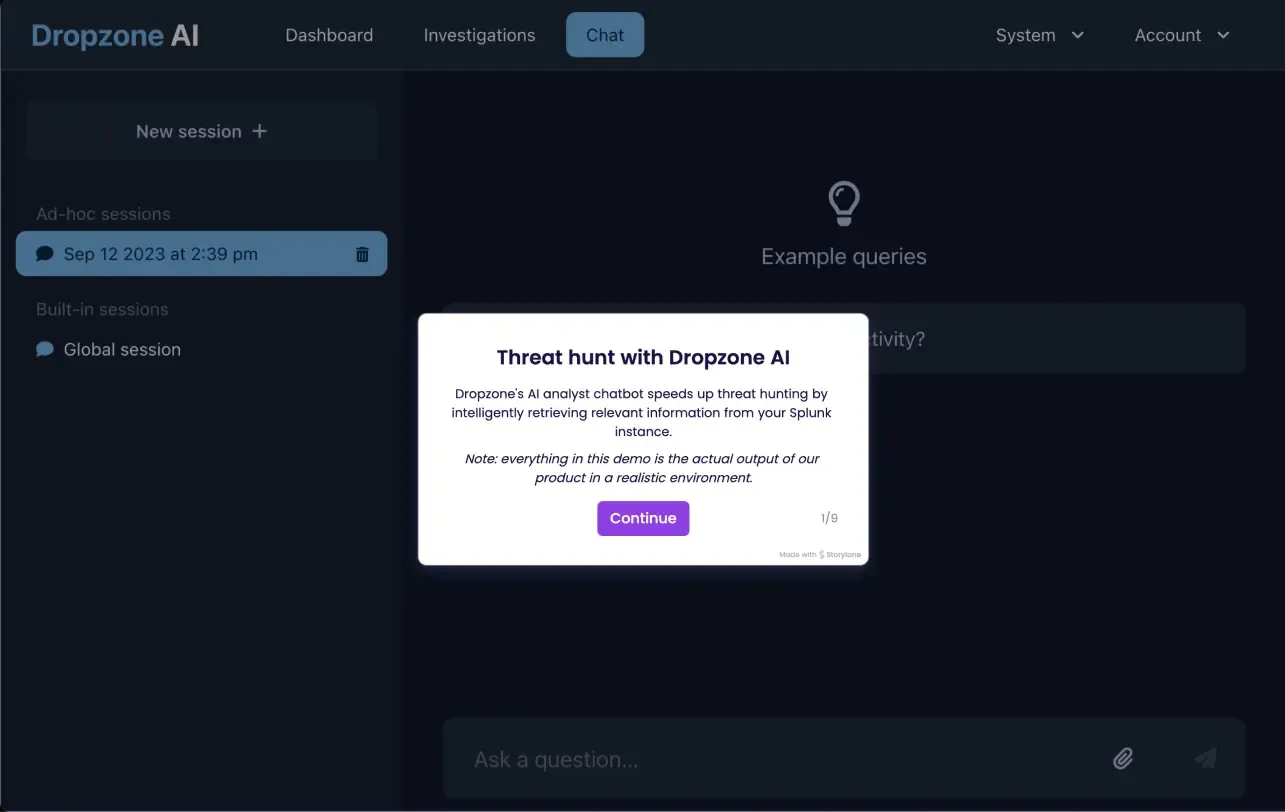
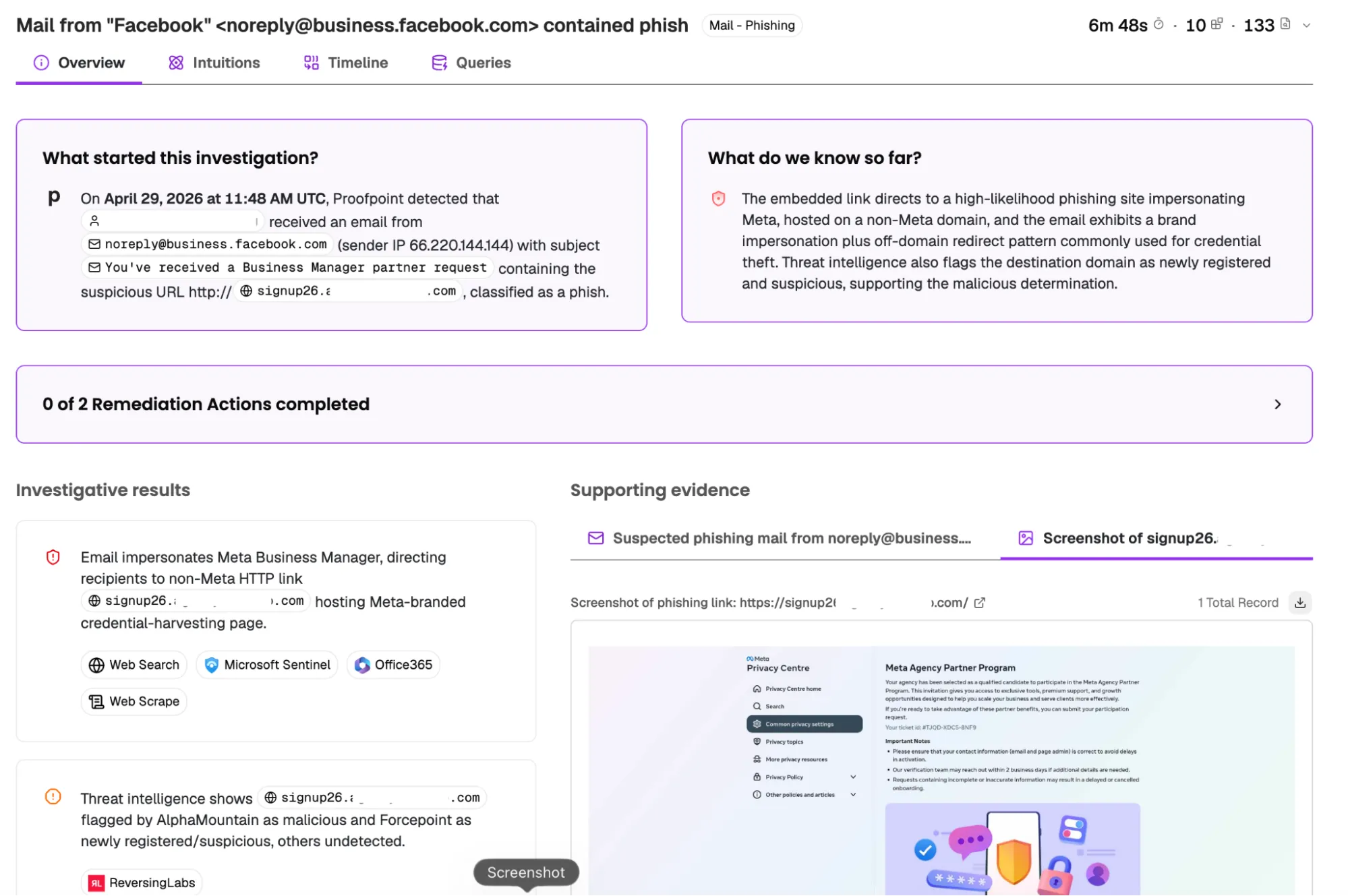
Dropzone AI runs an AI SOC Analyst that takes an alert from arrival to a documented conclusion. It supports phishing, endpoint, network, cloud, identity and insider threat alert types, and sits alongside an AI Threat Hunter and an AI Threat Intel Analyst.
Investigations move through collect, investigate, conclude, contain and adapt stages. The platform records every question asked, every tool queried and every finding produced, and connects to more than 90 security tools without data migration or log normalization. It is deployed at over 300 organizations.
Key features include:
- Autonomous alert investigation: Investigates thousands of alerts per day at consistent depth regardless of time of day, running entirely in software without vendor analysts operating behind the scenes.
- Reasoning transparency: Presents findings in plain English with a complete record of the questions asked and tools queried, producing an audit trail for compliance and governance review.
- Context memory: Learns details about the environment from analyst input and on its own, and applies that knowledge to subsequent investigations.
- Auto-containment actions: Fires containment steps such as blocking malicious IPs and disabling compromised accounts once an AI agent confirms a threat.
- Configurable investigation strategy: Lets teams set custom investigation strategies, outcome rules and context memory entries specific to their organization.
- Built-in investigation chat: Provides an AI chatbot for follow-up questions and ad-hoc investigations without moving between tools.
- Broad stack connectivity: Integrates with SIEM and data lake products, EDR and XDR tools, cloud platforms, DLP, and email systems, with EU data residency available.
Limitations (based on publicly available sources):
- Integration edge cases: Users have described some integrations and less common scenarios as still rough around the edges.
- Initial tuning period: Reported feedback points to time spent fine-tuning the product before verdict accuracy and false-positive rates settle.
- Workflow automation depth: The product focuses on investigation rather than complex conditional workflow logic, which remains the domain of dedicated SOAR platforms.
- Reporting and export: Users have noted limited options for exporting full investigation records into tickets and incident systems.
Source: Dropzone AI
3. Prophet Security

Best for: SOC teams wanting investigation, hunting and detection tuning
Strengths: Dynamically planned investigations with approval-gated response
Things to consider: Reporting depth and a thin public review record
Prophet AI SOC Analyst summarizes each incoming alert, extracts the artifacts, plans the questions an experienced analyst would ask, then runs those queries across connected SIEM, EDR, identity, cloud and email tools. Investigations start on arrival at every severity level.
Alerts are investigated in parallel, so investigation time stays flat whether the queue holds 50 alerts or 2,000. Every question, query and reasoning step is recorded. The product sits alongside an AI Threat Hunter, an AI Detection Engineer and Watchtower, an optional human-in-the-loop service.
Key features include:
- Dynamically planned investigations: Builds an investigation plan per alert rather than following a fixed playbook, then executes it across the connected stack.
- Incident grouping: Merges related investigations into a single incident so a campaign appears as one story instead of many separate tickets.
- Scoped remediation: Runs permissioned response actions ranging from notifications to quarantining a machine, previewed before execution and backtested against historical data.
- Autonomy controls: Investigates autonomously from day one but takes only actions that have been approved, with scope widened at the team's discretion.
- Plain-language guidance: Accepts playbooks, policies and preferences written in natural language and applied organization-wide, to a full investigation, or to a single step.
- Auditable learning: Shows the source of every learned entry so it can be corrected, and previews and backtests changes against history before they take effect.
- Workflow integration: Offers more than 200 out-of-the-box integrations and delivers results in-product or through Slack, Teams or a webhook, with per-channel control over scope and frequency.
Limitations (based on publicly available sources):
- Reporting depth: Users have asked for the reporting features to be refined further.
- Support options: Feedback includes requests to expand the available support options.
- Limited public review base: The number of verified reviews across major platforms is small, which makes independent comparison against established vendors harder.
Source: Prophet Security
SOAR and Security Automation Platforms
4. Cortex XSOAR

Best for: Large SOCs standardizing response across many products
Strengths: Very large marketplace of playbooks and integration packs
Things to consider: Steep learning curve and dedicated playbook maintenance
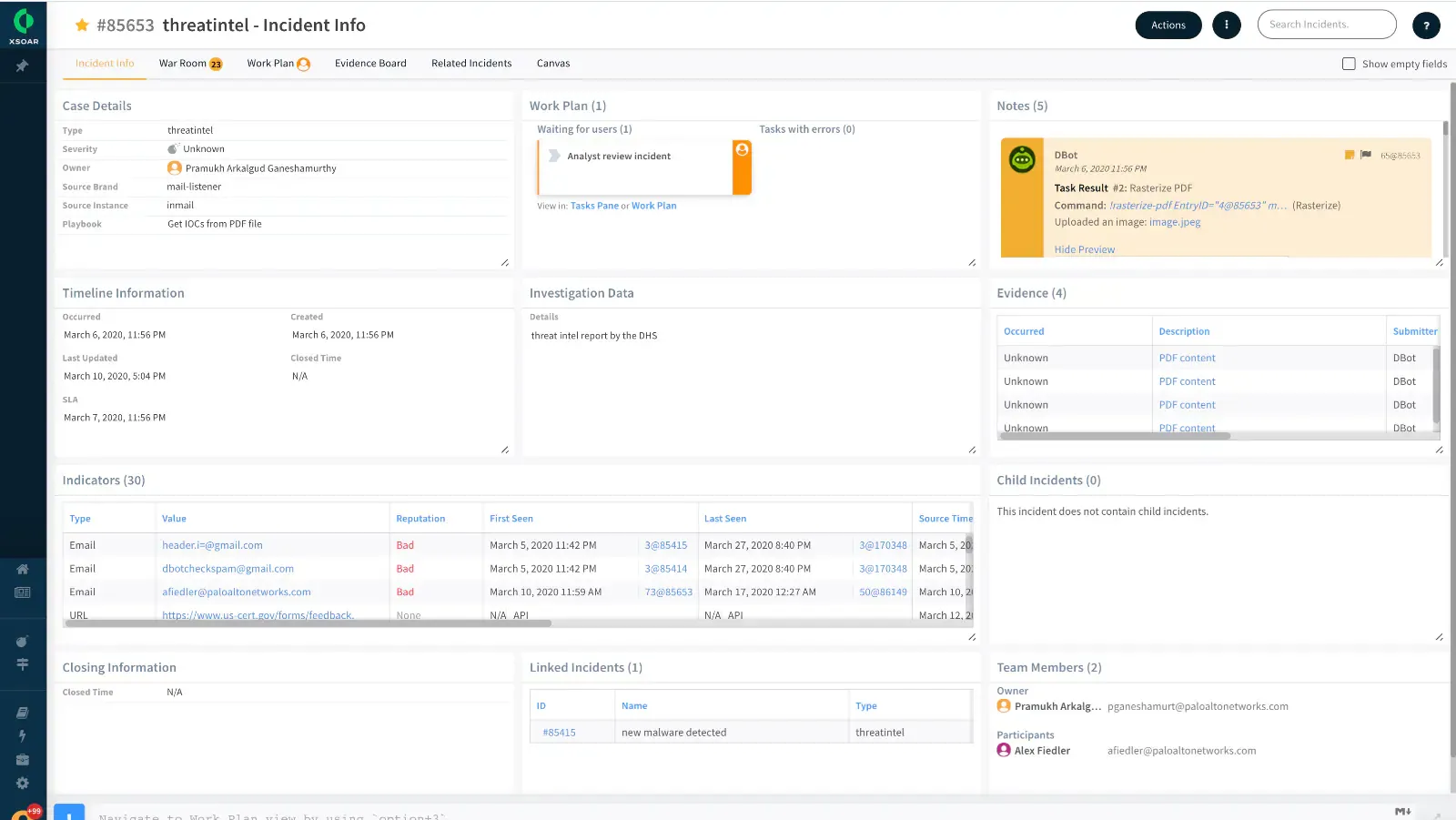
Cortex XSOAR from Palo Alto Networks orchestrates incident response across an organization's security stack. It unifies case management, playbook automation, real-time collaboration and threat intelligence management in one platform, with on-premises, private cloud and hosted deployment options.
Automation content is distributed through a marketplace containing more than 900 prebuilt integration and automation packs, covering use cases such as phishing, malware analysis and ransomware. A visual playbook editor allows workflows to be built without writing code, and thousands of security actions are available for custom playbooks.
Key features include:
- Playbook automation: Provides prebuilt playbooks and a codeless visual editor for building custom workflows, with automation content packs bundling integrations, playbooks, dashboards and dependencies for a particular use case.
- Virtual war room: Gives analysts a shared space for incident investigation and collaboration, with ChatOps and a command-line interface for running commands during an investigation.
- Auto-documentation: Records investigation activity automatically for knowledge sharing and audit reporting.
- Threat intelligence management: Automates indicator processing and scoring, maps external threats to open incidents, and pushes current indicators to external dynamic lists, with intelligence from Unit 42.
- Case management: Unifies alerts, incidents and indicators from different sources into a single case framework tied to the response automation.
- Machine learning assistance: Applies models trained on past incidents and analyst actions to guide analysts, including a phishing email classifier.
- Multitenant MSSP support: Offers a multitenant platform for managed service providers delivering security automation as a service.
Limitations (as reported by users on G2):
- Learning curve: Several users describe configuration as complex and note that it takes significant time to become proficient with the platform.
- Reporting customization: Users report that reporting features offer limited customization and would benefit from more flexibility.
- Log readability: Some reviewers find that data log output is hard to read within the available window size and often needs to be opened in a separate tab.
- Maintenance overhead: Reviewers note that prebuilt playbooks are generic and that a dedicated team is typically needed to build and maintain playbooks, mappers and classifiers.
- Licensing cost: Cost is raised repeatedly, particularly for multitenant MSSP deployments where architecture also becomes more complex.
Source: Palo Alto Networks
5. Splunk SOAR

Best for: Splunk Enterprise Security users automating response steps
Strengths: Broad action library and a visual playbook editor
Things to consider: Dense interface, cost and gaps in documentation
Splunk SOAR orchestrates a security stack by connecting to more than 300 third-party tools and supporting over 2,800 automated actions. It consolidates alerts and data from those tools so responses can be sequenced and prioritized from one place.
Automation is built through playbooks. The product ships with prebuilt playbooks aligned to the MITRE ATT&CK and D3FEND frameworks and to common SOC tasks. Splunk SOAR is now available as a native capability within Splunk Enterprise Security, and can also be deployed via cloud, on-premises or hybrid.
Key features include:
- Automated playbooks: Executes sequences of actions across security and IT tools, covering anything from individual steps to end-to-end use cases.
- Visual Playbook Editor: Assembles custom workflows from prebuilt code blocks, with editing options for users who are comfortable writing code.
- App integrations: Connects across 300+ third-party tools through Splunkbase apps, supporting 2,800+ automated actions without replacing the existing stack.
- Case management with workbooks: Codifies processes into reusable templates covering task segmentation, assignment and documentation, using custom templates or industry incident response standards.
- Prompt-driven automation: Sends real-time prompts to teams outside the SOC through ITOps, ChatOps or ticketing applications as part of a response workflow.
- Investigation panel: Prioritizes which threats to act on from a single location, with built-in threat research from the Splunk Threat Research Team.
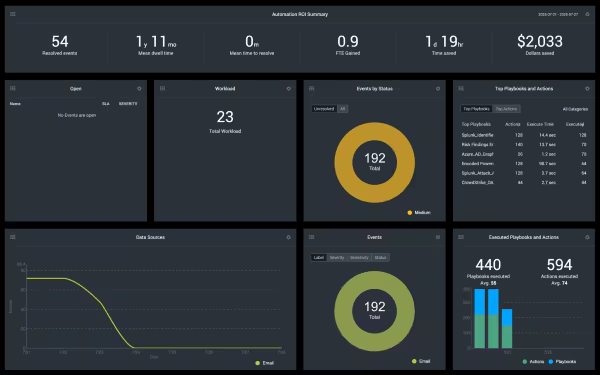
- Metrics dashboard: Tracks mean time to detect and respond, along with time and cost saved through automation.
Limitations (as reported by users on G2):
- Learning curve: Users describe a steep learning curve and note that significant knowledge is required to operate the platform effectively.
- Interface density: Reviewers report that the dashboard presents a large amount of information that is difficult to process for newer users.
- Cost: Several users describe the platform as expensive, particularly for smaller organizations and smaller projects.
- Documentation gaps: Users note that available documentation is not detailed enough, especially for those learning the platform.
- Support responsiveness: Some reviewers report slower support responses when working through complex issues.
Source: Splunk
6. Torq

Best for: Teams wanting agentic triage on top of workflow automation
Strengths: Auto Triage, AI agents and case management in one platform
Things to consider: Occasional interface glitches and documentation gaps
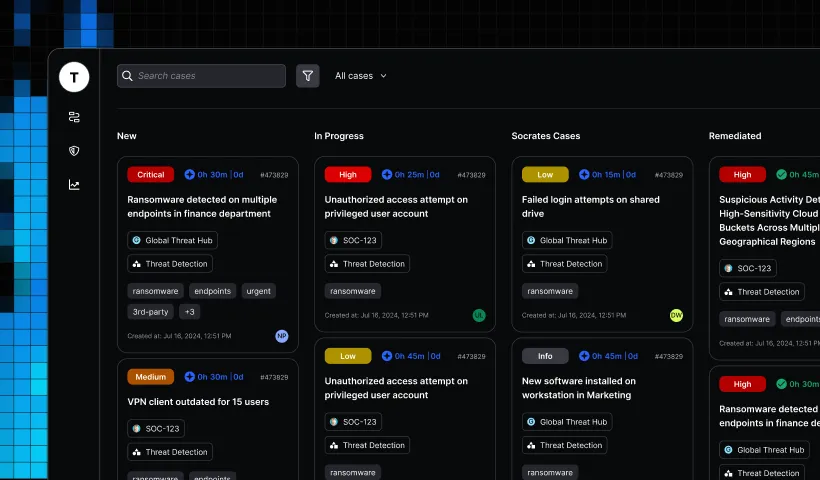
Torq combines agentic AI with workflow automation across the threat management lifecycle. It ingests and normalizes telemetry from across the security stack, correlating and deduplicating events before analyzing risk context and threat intelligence to produce a verdict.
Cases are opened and assigned to configurable AI agents that gather evidence, assemble timelines and summarize findings, with response actions executed at the end of the process. The platform provides 300 pre-built integrations and more than 4,000 pre-built steps, and AI agents can build additional integrations and workflows.
Key features include:
- Universal Auto Triage: Runs the agentic engine that separates noise from actual risk, learning and retaining how a given SOC handles alerts.
- Torq HyperAgents: Provides a set of autonomous, customizable AI agents that carry out routine tasks and workflow design under direction from the team.
- Socrates: Coordinates the specialized agents, manages cases end to end and accepts natural language instructions from analysts.
- Native case management: Maintains a single record of evidence, timelines and case summaries for collaboration from investigation through remediation.
- Hyperautomation: Handles workflow automation at scale across integrated security tooling, supporting both agentic and deterministic workflows.
- Agentic response actions: Executes containment and remediation steps and routes critical threats to the right people.
- Integration building with AI: Uses AI agents to generate new integrations, workflows and custom use cases rather than building each one manually.
Limitations (as reported by users on G2):
- Interface behavior: Some users describe the interface as not always intuitive and occasionally glitchy during day-to-day use.
- Documentation depth: Reviewers note that documentation could be improved to help new users understand the product.
- Search and data retrieval: Users report that the system sometimes fails to retrieve data selected in fields and that search could be improved.
- Dashboard refresh: Some reviewers mention that dashboard auto-refresh does not always complete and can leave stale cases displayed.
- Development knowledge: Users note that getting full value from the platform benefits from prior development experience.
Source: Torq
7. Swimlane Turbine

Best for: High-volume automation across and beyond the SOC
Strengths: Routing between playbook, AI-assisted and agentic paths
Things to consider: Involved upgrades and engineering-heavy playbook design
Swimlane Turbine combines agentic AI with deterministic security automation on one platform. Alongside SOC workflows it covers vulnerability response management, compliance audit readiness and business continuity management.
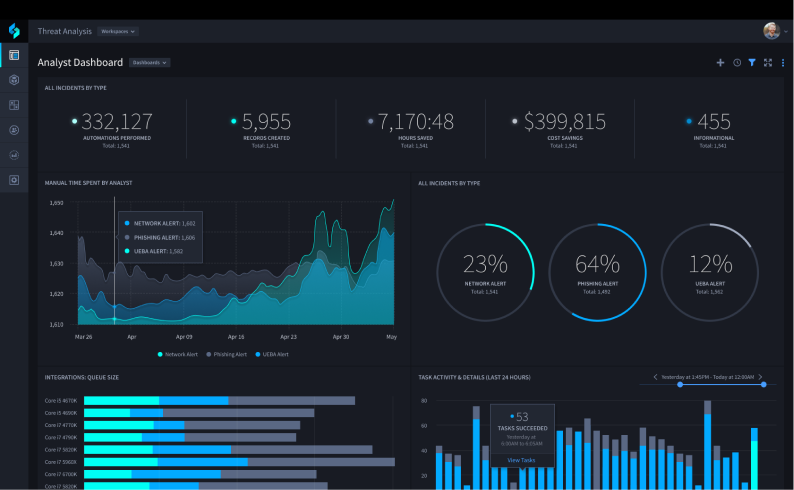
An intelligent routing layer acts as a dispatcher, sending each alert to a deterministic playbook, an AI-assisted path or a fully agentic investigation based on risk, complexity and available context. Straightforward alerts resolve without analyst time while complex cases go to human-in-the-loop review.
Key features include:
- Intelligent routing: Makes the routing decision automatically per alert, which offers a way to control token spend on AI-driven investigations.
- Turbine Canvas: Provides a playbook and AI agent builder for creating automation across the organization.
- Hero AI agents: Supplies incident response agents plus agents for visualizations, data ingestion and playbook generation, with the AI model behind each one selectable.
- Case management: Offers a customizable AI-driven case management application for incident response.
- Active Sensing Fabric: Handles distributed big data ingestion and high throughput processing beyond what traditional SOAR limits.
- Cloud-native scale: Executes up to 25 million actions per day for a single customer at a rate of 75,000 actions per minute, with on-premises and air-gapped deployment also supported.
- Swimlane Marketplace: Supplies an expanding set of pre-built connectors for integrating with any API in the environment.
- Dashboards and reporting: Delivers customizable dashboards and AI-augmented reporting for KPIs, ROI and compliance, including multi-tenant dashboards for MSSPs.
Limitations (as reported by users on G2):
- Interface appearance: Users describe the interface as dated and in need of a refresh.
- Upgrade process: Reviewers report that updates are more involved than in comparable products and that upgrades have failed, requiring engineering assistance to diagnose.
- Support response times: Some users note that support is sometimes slow to respond.
- Deployment effort: Reviewers describe initial deployment and playbook design as resource-intensive and dependent on skilled engineering expertise.
- Connector maintenance: Users report that connectors and APIs require frequent updates, and that poorly tuned or over-automated playbooks risk escalating false positives into automated actions.
Source: Swimlane
8. Tines

Best for: Teams building security workflows without heavy coding
Strengths: Connects to any API with an accessible drag-and-drop builder
Things to consider: Large workflows get hard to debug and trace
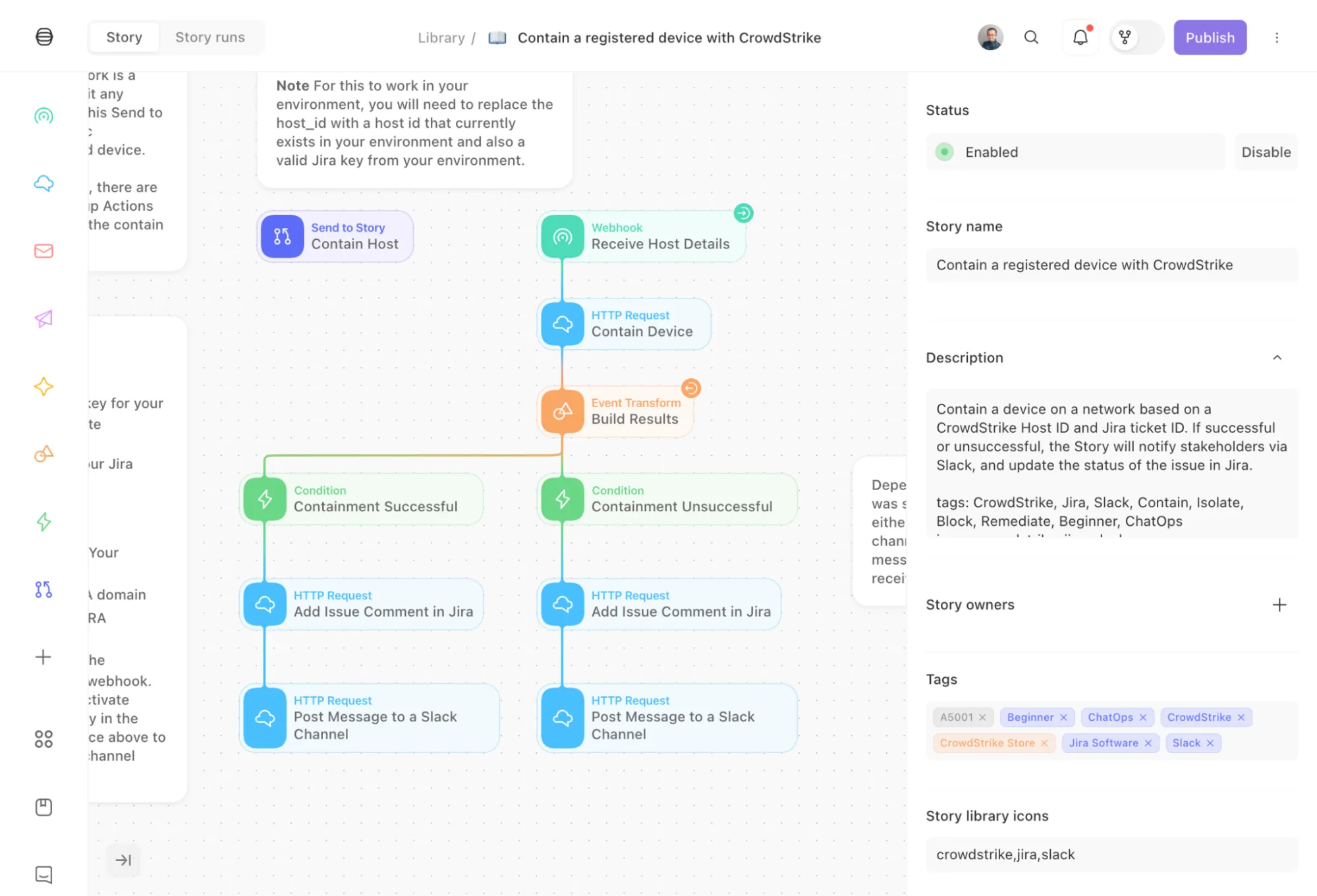
Tines is a workflow platform used by security teams to automate processes across their stack. Workflows can be built using natural language or designed step by step in a drag-and-drop interface, and Python can be used where teams prefer it.
The platform connects to any vendor, enriches alerts with additional context and pulls intelligence from across the security stack. Its security solution areas cover AI SOC, SOAR, GRC, threat intelligence, vulnerability management and network security, and the same environment is available to teams outside security.
Key features include:
- Flexible workflow building: Builds agents, apps and automations from natural language descriptions or through the visual designer, covering endpoint detection and response through to AI SOC workflows.
- Alert enrichment: Connects to any vendor and uses AI to add context to alerts by pulling in intelligence from across the connected stack.
- AI-assisted triage: Surfaces the alerts that matter and filters out noise, with the team choosing when a workflow acts autonomously and when a human decision is required.
- Full audit trail: Maintains a complete record of every action taken across the security stack, with built-in monitoring and auditability.
- Flexible case management: Builds case templates that match how a team works and lets AI agents create, triage and resolve cases at a chosen level of autonomy.
- Organization-wide access: Provides one governed environment where teams outside security can build and deploy workflows while security retains visibility.
Limitations (as reported by users on G2):
- Debugging at scale: Users report that workflows running past roughly 50 steps become messy and difficult to debug or trace.
- Script editing: Reviewers note the absence of a more advanced script editor, citing autocomplete, syntax highlighting and error handling as gaps when building complex logic.
- Documentation examples: Some users say documentation could include better function usage examples.
- Cost for smaller teams: Pricing concerns appear repeatedly among small businesses and startups evaluating the platform.
- Change control: Users note that approving changes on a per-user basis is difficult when several people edit the same workflow.
Source: Tines
SIEM and XDR Platforms with Built-In Automation
9. Microsoft Sentinel

Best for: Microsoft-centric SOCs wanting SIEM and SOAR together
Strengths: Built-in SOAR, UEBA and threat intel with 400+ connectors
Things to consider: Ingestion costs and a KQL learning curve
Microsoft Sentinel is a cloud-native SIEM that correlates signals across identities, endpoints, cloud applications and infrastructure. Security orchestration, automation and response is built into the product rather than added separately, alongside user and entity behavior analytics and threat intelligence.
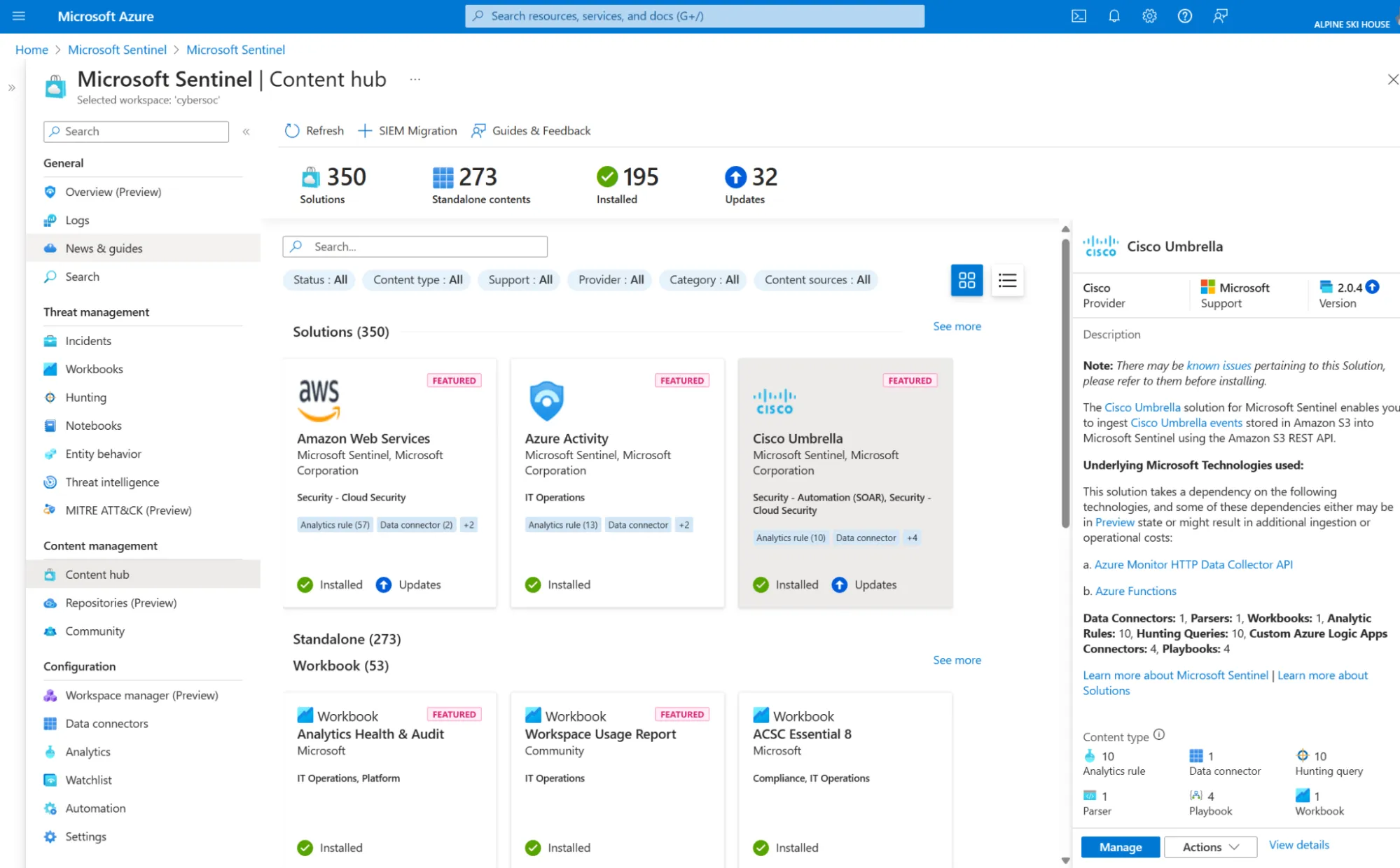
The platform ingests data from more than 400 connectors and includes a codeless framework for building custom ones. It is delivered inside the Microsoft Defender portal together with Microsoft Defender XDR, and includes a built-in data lake for long-term log retention.
Key features include:
- Built-in SOAR: Ships out-of-the-box playbooks and codeless automation for orchestration and response, reducing the number of alerts that reach manual triage.
- User and entity behavior analytics: Baselines normal activity and flags deviations that rule-based detection does not catch, including compromised accounts and insider risk.
- Built-in data lake: Stores and queries years of security data for hunting, compliance and AI-powered detection separately from hot SIEM storage.
- SOC optimization: Uses AI-driven recommendations to tune rules, surface high-fidelity alerts and point teams to a next action.
- Security Copilot: Summarizes incidents, drafts Kusto Query Language queries and recommends next steps within the Sentinel workflow.
- Threat intelligence: Unifies Microsoft threat signals with third-party feeds in industry-standard formats to add context to detection and investigation.
- Connectors and content: Supports more than 350 ready-to-use connectors, a codeless connector framework, and a library of over 480 customizable security solutions.
- Migration tooling: Converts Splunk and QRadar detection rules into native Sentinel detections using an AI-assisted migration experience.
Limitations (as reported by users on G2):
- Cost visibility: Users describe pricing as confusing, particularly around data ingestion, and note that costs can overshoot without close monitoring.
- Query learning curve: Reviewers report that it takes time to become comfortable writing queries in the platform.
- Setup complexity: Several users describe setup and configuration as complex, especially for teams unfamiliar with Azure.
- Interface navigation: Some users find the interface difficult to navigate and note that understanding its features takes time.
- Rule tuning: Reviewers note that out-of-the-box analytics rules still require fine-tuning to reduce noise.
Source: Microsoft
10. CrowdStrike Falcon Fusion
Best for: Falcon platform users automating response in one console
Strengths: No-code workflow builder with Charlotte AI generation
Things to consider: Premium pricing and effort to onboard third-party data
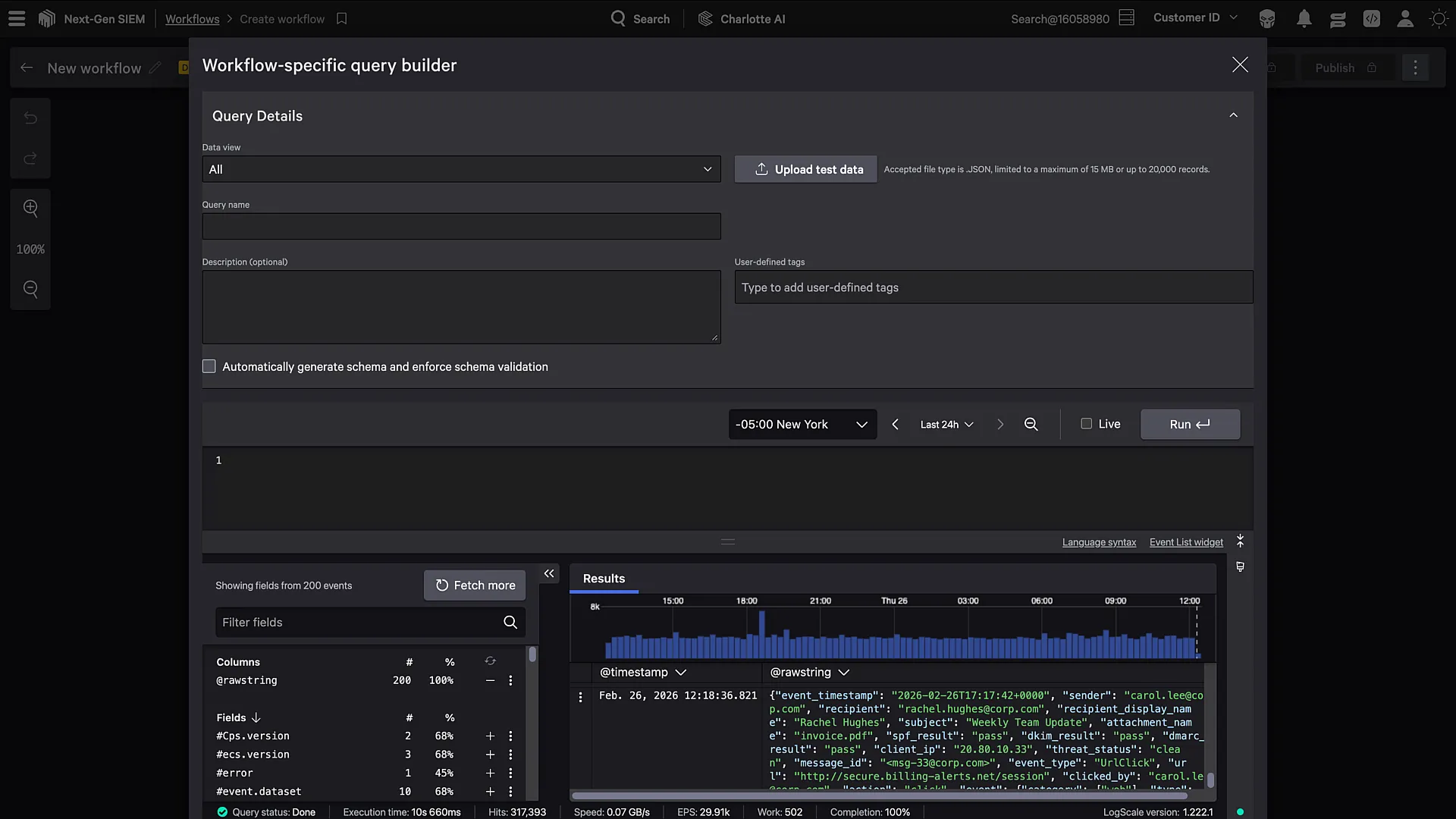
CrowdStrike Falcon Fusion provides the security orchestration, automation and response layer inside the Falcon platform. Workflows are built through a no-code interface, started from pre-built playbooks, or generated from a description using Charlotte AI.
Fusion combines deterministic workflow automation with AI reasoning to build agentic workflows, and integrates with native case management so investigation and response happen in the same console. Out-of-the-box integrations, pre-built actions and third-party agents connect the workflow engine to the wider security stack.
Key features include:
- No-code workflow creation: Builds SOAR workflows through a visual interface, from pre-built playbooks or from ideas described to Charlotte AI.
- Multi-agent orchestration: Combines workflow automation, AI reasoning and human expertise so agentic steps run alongside deterministic automation in the same workflow.
- Native case management: Centralizes investigation and response, with the case system integrated directly into workflow automation.
- Data Transformation Agent: Handles complex SOAR data operations through AI-powered conversation rather than manual configuration.
- Third-party orchestration: Connects external tools through out-of-the-box integrations, pre-built actions, third-party agents and ready-to-run playbooks.
- Metrics dashboard: Tracks workflow metrics centrally to show where response times can be reduced and where operations can be adjusted.
Limitations (as reported by users on G2): Falcon Fusion is a component of the Falcon Next-Gen SIEM offering, and G2 reviews are published against the parent product. The points below reflect feedback that specifically discusses the SIEM and automation layer.
- Pricing and licensing: Users place the platform at the premium end of the market and describe the licensing model as complex to navigate.
- Ingestion costs: Reviewers note that data ingestion costs can escalate quickly and require planning upfront.
- Query language learning curve: Users coming from other SIEM platforms report a real ramp-up period before writing efficient queries.
- Third-party data onboarding: Reviewers note that integrating non-CrowdStrike telemetry still requires significant effort.
- Customization and documentation: Some users describe customizability as limited and documentation as lacking detail.
Source: CrowdStrike
11. Google Security Operations

Best for: Teams wanting SIEM, SOAR and threat intel in one platform
Strengths: Playbook lifecycle management with Gemini-assisted response
Things to consider: Cost, learning curve and limited customization options
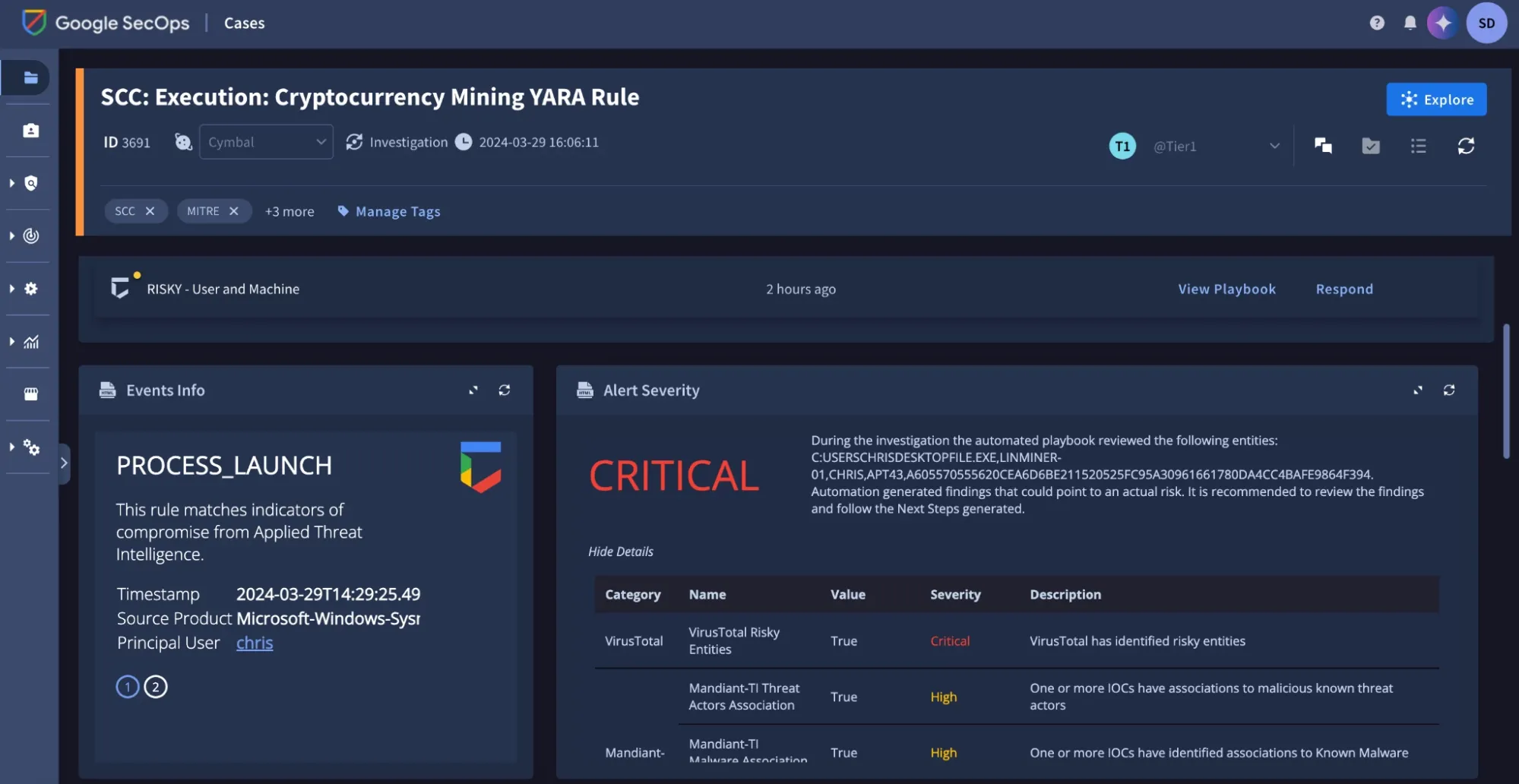
Google Security Operations, formerly Chronicle, provides a unified experience across SIEM, SOAR and threat intelligence. Telemetry is collected and normalized, threat intelligence is applied to identify priority threats, and response runs through playbook automation, case management and collaboration.
The Standard package includes access to more than 700 parsers and 300 SOAR integrations with 12 months of hot data retention. Higher tiers add user and entity behavior analytics built with YARA-L, Google-curated detections, Gemini in Security Operations, and Applied Threat Intelligence drawing on Mandiant and VirusTotal.
Key features include:
- Automated response playbooks: Ships ready-to-run use cases for scenarios such as phishing and ransomware, complete with playbooks, simulated alerts and tutorials.
- Drag-and-drop orchestration: Builds playbooks that orchestrate hundreds of tools without coding, with a built-in Python IDE for custom integrations.
- Playbook lifecycle management: Supports maintenance and iteration through run analytics, reusable playbook blocks, version control and rollback.
- Gemini in Security Operations: Provides threat context and response recommendations, and can generate remediation playbooks.
- Entity context and threat intelligence: Visualizes who did what and when, along with the relationships between entities attached to an event, product or source.
- Case wall collaboration: Lets analysts chat, tag colleagues, assign tasks and track case progress from within the case.
- SOC metrics and reporting: Supplies interactive reports and dashboard templates covering detection rates, cases closed and performance over time, with a business intelligence layer for deeper analysis.
- Audit repository: Captures all analyst case activity, automated actions, chats, tasks and uploaded files in a single searchable and auditable repository.
Limitations (as reported by users on G2):
- Cost: Users consistently raise high cost as a drawback of the platform.
- Support responsiveness: Reviewers report slower support responses that can delay issue resolution.
- Learning curve: Users note that the platform takes time to learn and that training requirements should be factored in.
- Customization options: Some reviewers describe customization as limited, which affects adaptability for organizations with specific requirements.
- Documentation: Users note that documentation support is an area that could be improved.
Source: Google
Conclusion
SOC automation tools help security teams reduce repetitive work by automating alert triage, enrichment, investigation, response, and case management across connected systems. The most suitable approach depends on the existing security stack, the level of automation required, and how much control analysts need over response actions. Teams should prioritize integration coverage, transparent investigation logic, approval controls, workflow flexibility, and reliable audit trails so automation improves response speed without reducing visibility or oversight.